Keyboard Shortcuts
Press ? anywhere outside a text field to open Kanera's shortcut sheet. The sheet adapts to the current screen: board shortcuts appear on a board, and card shortcuts appear while a card is open.
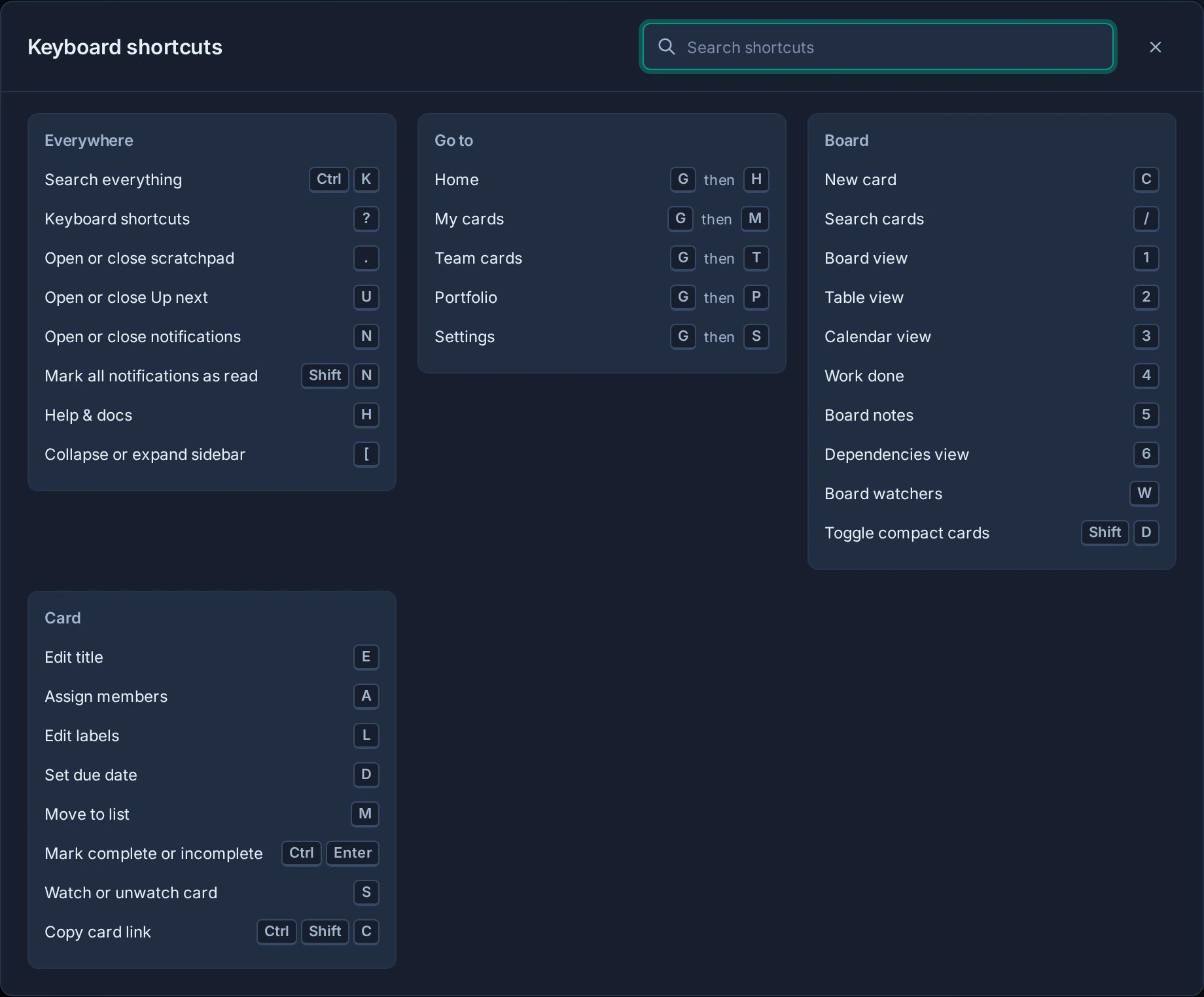
On macOS, Command replaces Ctrl. Single-letter shortcuts pause while you are typing in an input, text area, select, or editor.
Use Search shortcuts at the top of the sheet to filter actions by name or key without leaving the dialog.
Available everywhere
| Shortcut | Action |
|---|---|
| Ctrl/Command + K | Search everything and open quick actions |
| ? | Open the keyboard shortcut sheet |
| . or Ctrl/Command + Shift + . | Open or close Scratchpad |
| U | Open or close Up next |
| N | Open or close notifications |
| Shift + N | Mark all notifications as read when Kanera is online and unread notifications remain |
| H | Open Help and docs |
| [ | Collapse or expand the sidebar |
Go to a page
Press the two keys in sequence:
| Shortcut | Destination |
|---|---|
| G, then H | Home |
| G, then M | My Cards |
| G, then T | Team Cards |
| G, then P | Portfolio (unless your organisation has hidden it) |
| G, then S | Settings |
On a board
| Shortcut | Action |
|---|---|
| C | Create a card |
| / | Focus card search |
| 1 | Board view |
| 2 | Table view |
| 3 | Calendar view |
| 4 | Work Done |
| 5 | Board Notes |
| W | Open board watchers |
| Shift + D | Toggle compact cards in Board view |
Board actions only run when the current board and view support them. For example, C is unavailable on a read-only board and while Board Notes is open.
While a card is open
| Shortcut | Action |
|---|---|
| E | Edit the title |
| A | Assign members |
| L | Edit labels |
| D | Set the due date |
| M | Move the card to another list |
| Ctrl/Command + Enter | Mark the card complete or incomplete |
| S | Watch or unwatch the card |
| Ctrl/Command + Shift + C | Copy the card link |
Editing shortcuts follow the card's permissions. Watching and copying a link remain available when you can view the card.
Dependency map editing
In the Dependencies view, Map and Timeline support these controls:
| Shortcut | Action |
|---|---|
| Enter or Space on a card's + handle | Choose the card it blocks next. |
| Enter or Space on a connector | Reveal Remove for an editable relationship. |
| Escape | Cancel linking or dismiss the selected connector. |
| Ctrl/Command+Z | Undo your latest dependency-map edit. |
| Ctrl/Command+Shift+Z | Redo your latest undone dependency-map edit. |