Managing Users
Kanera has two common ways people get access to work in an organisation:
- Workspace users: people in your organisation who are added to a workspace.
- Guests: people outside your organisation who are invited to selected boards only.
On a standalone board, active organisation users can be granted access directly because there is no separate workspace member roster. External collaborators still use guest access.
The distinction matters. A user can be a full member of several organisations. Workspace users are members of the active organisation; guests remain external collaborators with selected-board access. Day-to-day access for both is granted board by board, while Workspace Admin controls workspace configuration and inherits access to every board.
Open user settings
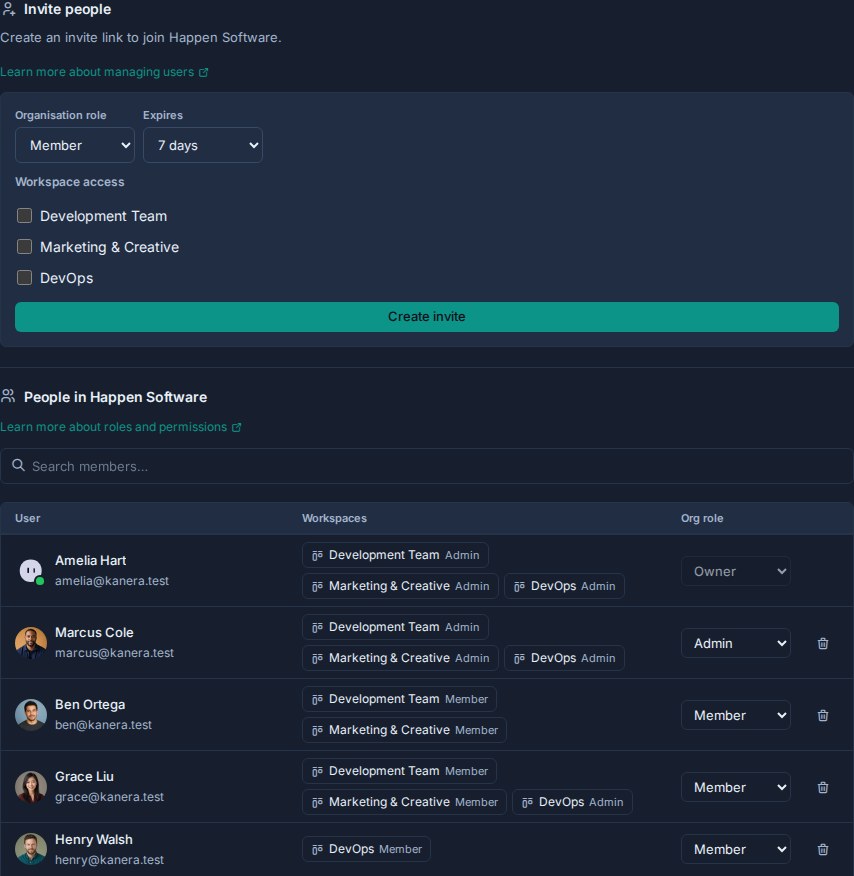
- Open the user menu and confirm that the intended organisation is active.
- Choose Manage users to create organisation membership invitations and manage existing members.
- Open a workspace and go to Workspace settings.
- Choose Members to manage workspace users.
- Choose Boards -> Manage access to manage each board's internal members and accepted guests.
- Choose Guests to invite external board guests or review pending invitations.
Main concepts
| Person type | Belongs to your org? | Counts toward seats? | Access scope | Where to manage |
|---|---|---|---|---|
| Organisation user | Yes | Yes | Can be added to one or more workspaces. | Organisation user settings, then workspace Members. |
| Standalone board member | Yes | Yes | Specific standalone board access as Editor or Observer. | The board's access menu. |
| Workspace user | Yes | Yes | Workspace membership. Admins inherit every board; Members need an explicit grant per board. | Workspace settings -> Members and Boards. |
| Guest | No | No for the first board. One purchased seat for two or more boards on hosted Pro. | Specific board access only. | Workspace settings -> Guests. |
The most important rule is simple: guests are external and board-only. If someone is part of your organisation's operating team, send an organisation invitation, add them to the required workspaces, then grant the boards they need. They can accept with an existing account even if it already belongs to another organisation.
For a standalone board, add an internal person to the organisation and grant them access from the board directly. No workspace-membership step is required.
Every explicit board grant has an Editor or Observer role. It can also be limited to Assigned items only, which shows the person only cards assigned directly to them or through a checklist item.
Workspace users are organisation users, so they count toward your organisation's seats. Guests are external board-only collaborators. On hosted Pro, a guest's first board across the organisation is free. A second or later board uses one purchased seat in total, without expanding the guest's access beyond explicitly granted boards.
When to use members vs guests
| Situation | Use |
|---|---|
| Employee, internal teammate, or long-term collaborator | Organisation user + workspace member |
| Project manager who needs Team Cards and Portfolio across boards | Workspace member |
| Client who only needs one delivery board | Guest |
| Contractor who only needs one board | Free guest |
| External partner who needs two or more specific boards | Guest using one purchased seat |
| External partner who needs broad workspace access or ongoing team access | Organisation user + workspace member |
| Someone who only needs to read a board | Observer role, either as workspace member or guest depending on whether they are internal or external |
When in doubt, ask whether the person should join your organisation or remain limited to selected boards. If they belong in your operating team, send an organisation invitation. If they only need selected external work, invite them as a guest even when their account belongs to another organisation.