Connect Kanera to your AI agent
Connect the AI tools you already use to search, plan, summarize, and update real Kanera work across every accessible board.
Plan availability: Hosted AI agent connections require a paid or trial Kanera plan. Free organisations can start a trial during setup.
Connect now
Choose the shortest path for your AI client. OAuth is recommended for a personal assistant because you do not need to create or store an API key.
Coding agents
Paste one instruction into Codex, Claude Code, Cursor, Copilot, Gemini CLI, or OpenCode.
Fetch https://www.kanera.app/agent-setup/prompt.md and follow it.Other MCP clients
Add the hosted server address. A compatible client opens Kanera sign-in and consent.
https://mcp.kanera.app/mcpThe setup prompt installs Kanera's official Agent Skill, registers the hosted MCP server, and starts OAuth where the coding agent supports it. If an agent has shell access but no MCP client, the same prompt gives it the @kanera/cli fallback instead. Always review the Kanera consent screen before allowing access.
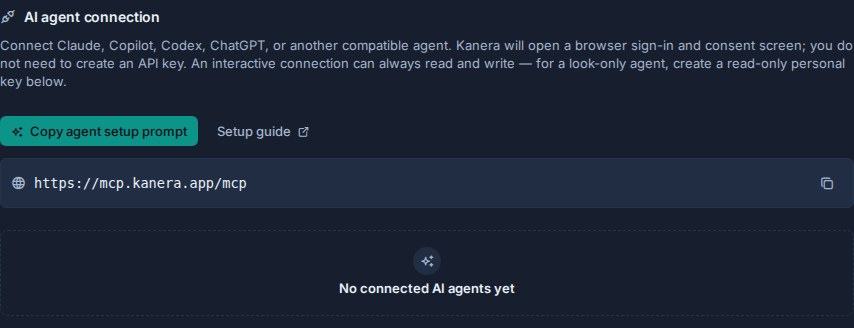
Choose your AI client
Use a client-specific guide when you want exact menu names, commands, configuration locations, and troubleshooting steps.
 ClaudeSet up Claude, Claude Desktop, or Claude Code.CodexConnect the ChatGPT desktop app, CLI, or IDE extension.GitHub CopilotAdd Kanera to Copilot in Visual Studio Code.
What you can do
Kanera MCP works across boards, assignments, ranked Up next queues, notes, comments, labels, custom fields, checklists, and activity. These workflows show where the connection is most useful.
Plan work, then track it as code lands
Read this repository and the "Upgrade dependencies" card. Write the implementation plan into the card, add one checklist item per project, and update each item after its build passes.
A coding agent can keep the shared card current while it works in the repository. Changes require Write access.
Prepare a standup from real progress
Prepare my standup across the boards I can access. Separate work completed yesterday, work in progress today, and blockers.
Combine personal work history with current cross-board assignments instead of inferring progress from card creation dates.
Review workload across boards
Show open work per person across this workspace. Flag overdue, unassigned, and stale cards, then suggest where work could move.
A bounded team-work query exposes assignment, overdue, unassigned, inactivity, and last-moved evidence without opening each board separately.
Show the board what the agent is doing
Open an agent run on PLAT-42 before you start, keep it updated as you go, and mark it blocked if you need a decision from me.
A run puts a live chip on the card naming the agent and the job, so a long task is visible while it happens rather than only once it lands. Requires Write access.
Turn notes into structured work
Read my onboarding note and draft cards for each action item. Show the proposed fields before creating anything.
Use a draft, review, apply pattern. Reading and drafting are read-only; creating cards requires Write access.
See more practical prompts and workflows →
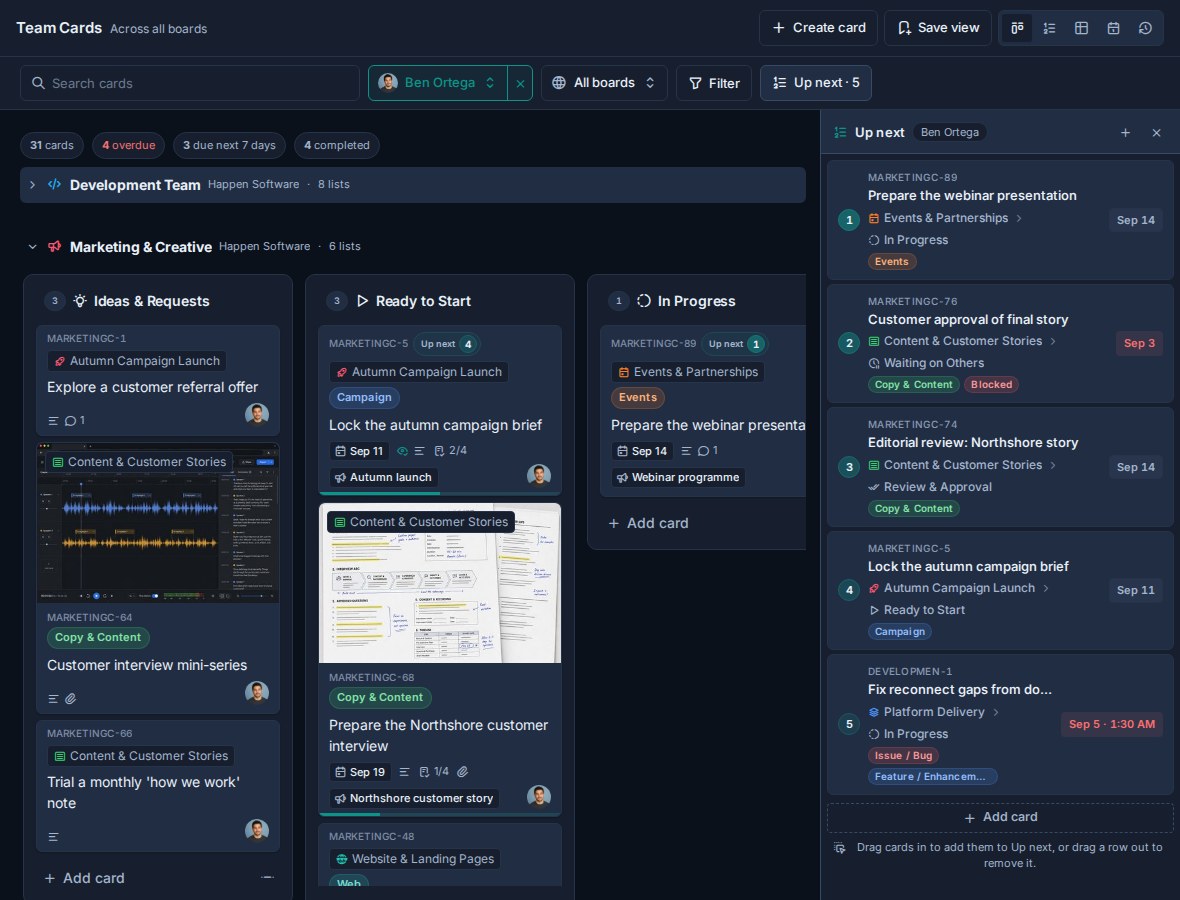
Agent work is attributed to the agent
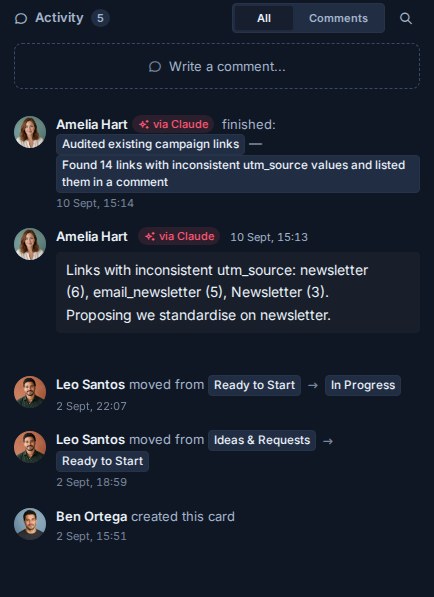
An AI agent connected through OAuth acts on your behalf, but Kanera does not record its work as yours. Comments, card changes, and activity rows it writes are attributed to the agent acting for you, and appear with a via <agent> badge — so a comment Claude wrote never reads as something you typed six weeks later.
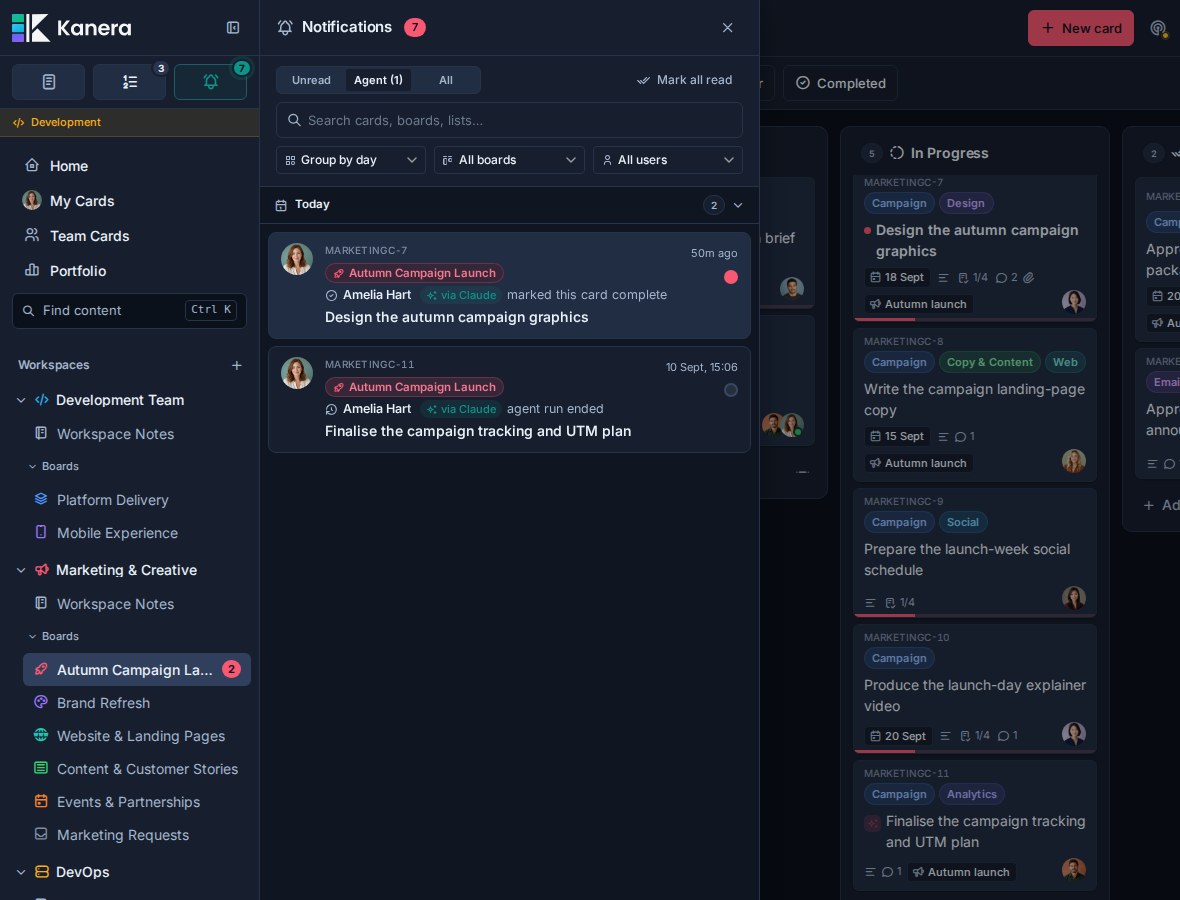
Kanera normally leaves you out of notifications about your own actions. Your agent is the exception: you are notified about what it did while you were elsewhere, because delegating the work is not the same as watching it. Once an agent has done anything for you, the notification drawer gains an Agent tab beside Unread and All: a review queue of everything your agents did, read or unread, with the unread count in the tab label. Each row carries a via <agent> badge, and grouped by user your agent's work sits in its own group rather than merging into yours.
Reporting reads the same way. In Work Done, a row an agent produced shows a sparkles mark beside the person and is attributed <person> via <agent>, so a week's delivery never quietly counts an agent's output as somebody's own hours.
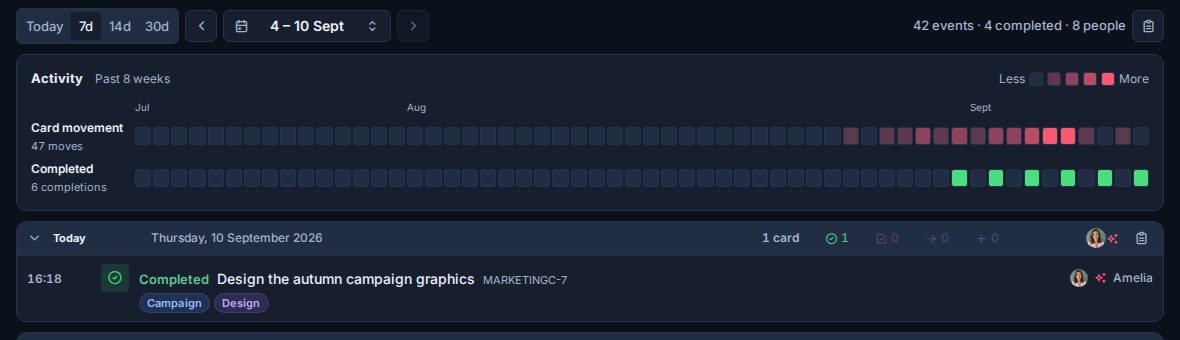
A personal API key used by your own script still acts as you, with no agent label. The distinction is the interactive agent connection, not the transport.
Runs make in-flight work visible
Before starting a multi-step job, an agent can open a run on the card with runs.start. The card
tile then carries a live chip naming the agent and the work, so anyone looking at the board can see
that something is happening — and not start it themselves.
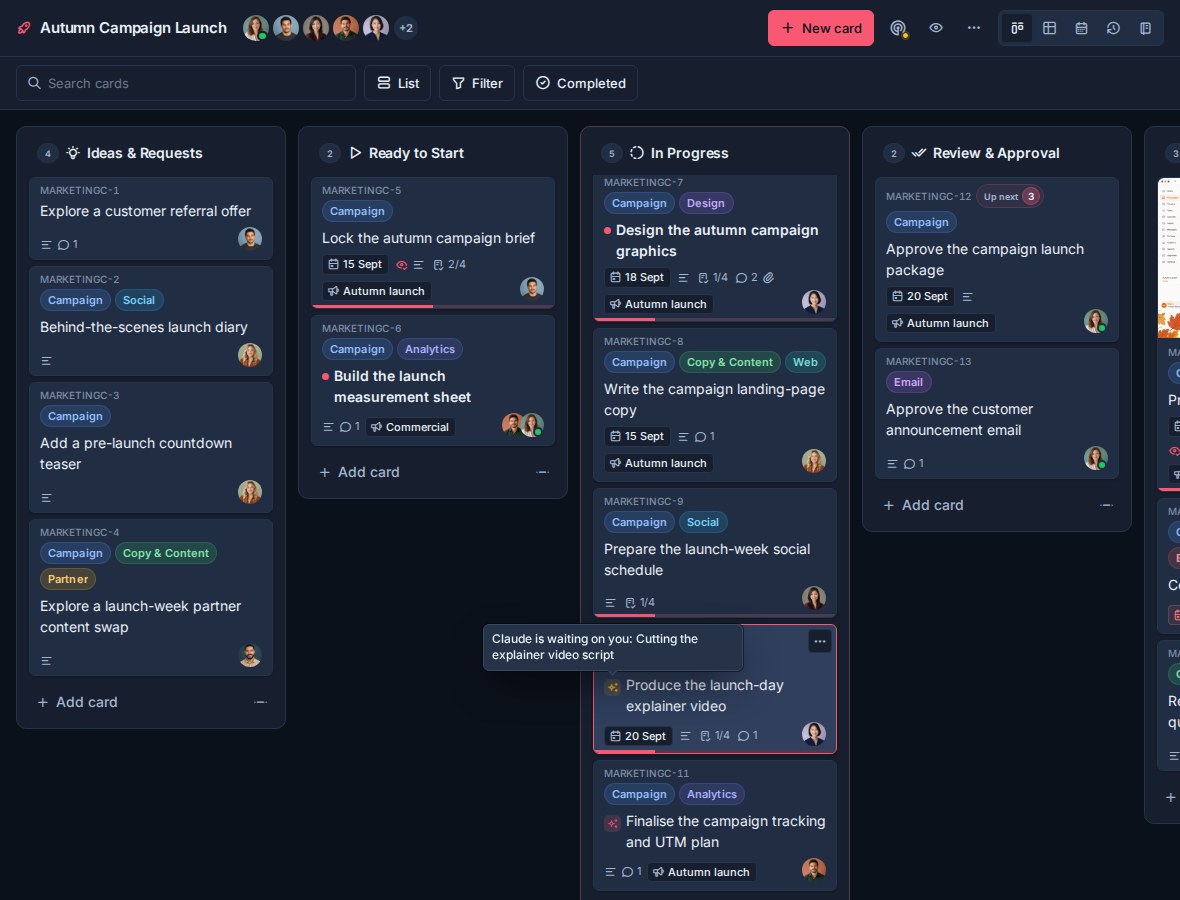
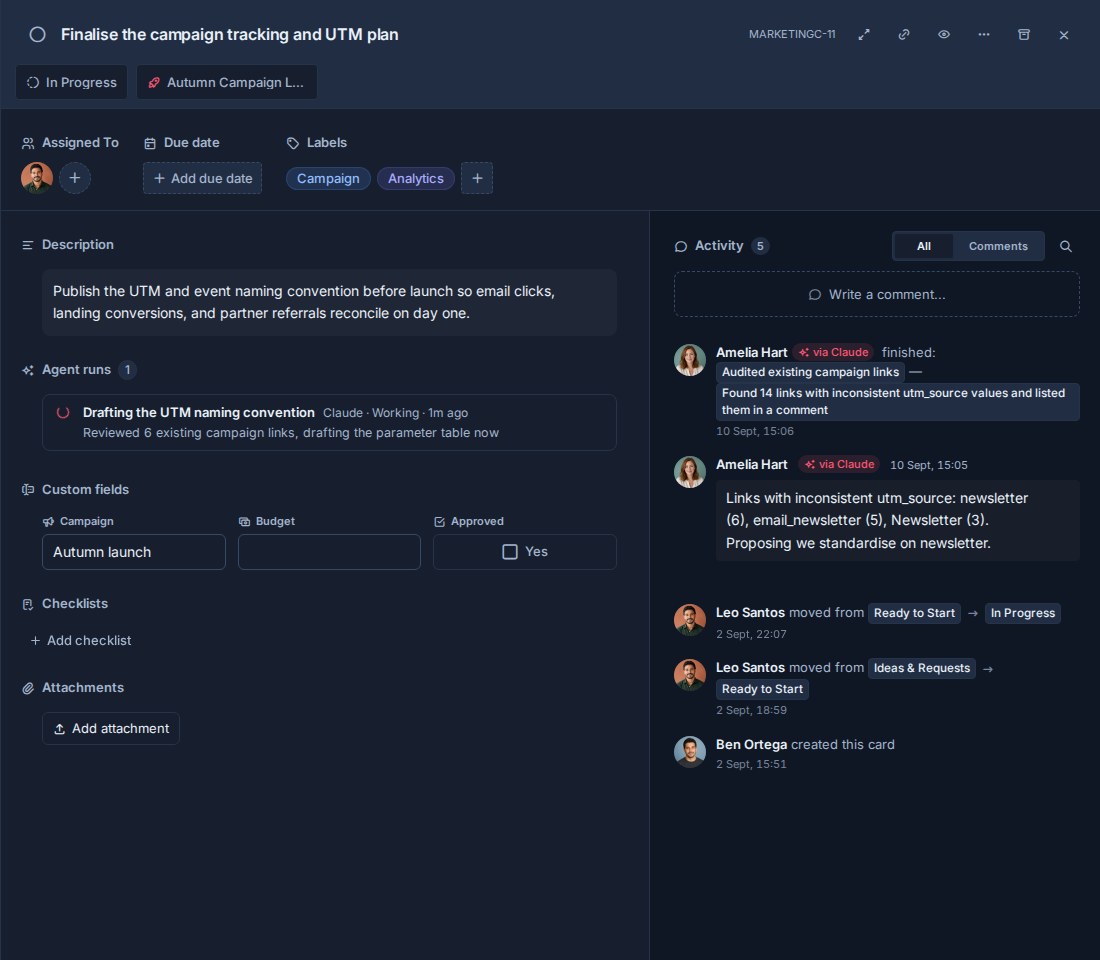
The chip turns amber when the agent reports itself blocked on a person, and clears when the run
ends. Open the card and the live run sits directly under the description with its agent, status,
and latest progress note. When the run ends, that block disappears and the outcome becomes a row in
the card's activity feed — "finished: …" with the closing summary — so history lives in one place.
The start itself is not repeated in the feed; the live block is where in-flight work shows.
A run that stops reporting is marked stalled after fifteen minutes, so a crashed agent cannot leave a card looking busy forever. See the example flow for the prompts, and the public API reference for the endpoints and status semantics.
Why Kanera MCP
Kanera exposes more than single-board card operations:
- Work across your accessible boards. Personal OAuth connections and personal keys follow your current board permissions across workspaces, standalone boards, and guest boards.
- Use the right identity for the job. Connect as yourself with OAuth, create a scoped unattended agent for CI or cron, or use an API key for a local or custom deployment.
- Manage complete workflows. Work with cards, ranked Up next queues, checklists, comments, labels, custom field values, assignments, notes, attachments, activity, completed work, portfolio summaries, and bounded bulk card actions.
- Keep sensitive automation narrow. Personal OAuth connections are read/write-capable so they work consistently across MCP clients, while the client decides which tools the user can invoke and when to ask for approval. API keys and unattended agents can still be capped at Read. Workspace setup stays in the Kanera interface.
- Give the agent product guidance. The official Agent Skill teaches safe discovery, stable ID resolution, idempotency, permission handling, and Kanera's workspace model.
Access at a glance
| Connection | Acts as | Best for |
|---|---|---|
| OAuth | You, within your current Kanera permissions | ChatGPT, Claude, Codex, Copilot, and other personal assistants that support remote MCP OAuth |
| OAuth device code | You, within your current Kanera permissions | A CLI, SSH session, or headless machine that cannot open a browser redirect |
| Unattended agent | A workspace service identity limited to the access level selected by an administrator | CI, cron, and server-side automations |
| Personal API key | You, across the boards you can access, capped by the key's Read or Write scope | Local MCP clients and custom personal integrations |
| Kanera CLI | The credential it holds | An agent that can run shell commands, or a local stdio MCP server via kanera mcp |
| Workspace or board API key | The workspace or standalone board where the key was created | Shared integrations that need a fixed destination and centrally managed scope |
Personal OAuth and device-code connections are read/write-capable. Your AI client controls which Kanera tools are available to you and when a write needs confirmation; Kanera then enforces your current role on the target board. For unattended automation or static credentials, use a Read-scoped service connection or API key when changes are not required. Configure workspaces, boards, lists, labels, fields, options, retention, and list ordering in the Kanera interface; agents can manage board-specific separators and their card-relative positions. Use a separate API key with the public REST API when a deliberately built integration genuinely needs another supported administration operation.
Frequently asked questions
What can an AI agent see?
A personal OAuth connection or personal API key can read content that you can access in Kanera. This may include boards in multiple workspaces, standalone boards, guest boards, and your private personal notes. Board access still follows explicit board membership.
A workspace or board connection is limited to the destination where its credential was created. An unattended agent is also limited by its configured maximum scope.
Can the agent change my work?
For personal OAuth and device-code connections, the AI client must allow the write tool and the acting user must be an Editor on the target board. Kanera rejects writes for Observers even when the client allows the action. Read-scoped API keys and unattended agents can inspect, search, summarize, and report without changing Kanera.
Ask the agent to show a draft or proposed plan before applying a sensitive or broad change.
What can and cannot be deleted?
Kanera MCP cannot delete boards, lists, custom fields, notes, or note attachments. Delete those manually in the Kanera interface.
Workspace, board, list, label, field, option, retention, and list-order administration is also UI-only in the default MCP server. Agents can still read that configuration so they can target work correctly, and can create, style, position, move, or delete board-specific separators inside list lanes.
It can delete comments authored by the acting user, checklists, and checklist items when you explicitly request the operation, the client allows it, and your Kanera role permits it. Write-capable API keys or service connections are required when OAuth is not used. Cards can be archived individually or in batches. See the technical reference for the complete boundary.
Will I be able to tell what the agent did, and what I did?
Yes. Work done through an interactive agent connection is recorded as the agent acting for you, not as you. Comments and activity rows carry a via <agent> badge, notification groups read <person> via <agent>, and Work Done attributes the row the same way. Agent activity is never presented as your own.
You are also notified about it. Kanera suppresses notifications about your own actions, but not about your agent's, so you find out what it changed without having to go looking. The notification drawer's Agent tab collects all of it in one place; it only appears once an agent has acted for you.
A personal API key used by a script you run yourself acts as you, with no agent label.
Can I see what an agent is working on right now?
Yes, when the agent opens a run. runs.start puts a live chip on the card tile naming the agent and the job; runs.update keeps it current and can mark the run blocked when the agent is waiting on a person, which turns the chip amber. A terminal status ends the run and it stays in the card's history.
Every update doubles as a heartbeat. If an agent crashes, Kanera marks its run stalled after fifteen minutes rather than leaving the card showing "working" indefinitely.
Can a connection access multiple workspaces?
Yes. A personal OAuth connection or personal API key follows the connected user's accessible boards across workspaces and standalone boards. A workspace key or unattended agent remains pinned to one workspace or standalone board.
How do I disconnect an agent?
Open Profile settings -> API keys, find AI agent connection, and choose Disconnect agent. Existing access and refresh tokens stop working immediately.
Delete an unattended agent from Workspace settings -> API to revoke its credentials and active tokens.
Does Kanera MCP consume AI tokens?
Yes. Kanera does not charge AI tokens, but MCP results become context in your AI client and count toward that client's message or token limits.
My team runs Kanera at its own address. Which MCP address do I use?
The one your own Kanera shows you. Open Profile settings -> API keys and use the MCP address listed there rather than the hosted default. For a coding agent, copy the setup prompt from the same page so it is filled in for you.
When should I use an API key?
Use an API key for local stdio, a client that only accepts a static bearer token, or a custom deployment where OAuth is unavailable. Prefer OAuth for an interactive personal assistant and an unattended agent for CI or server-side automation.
If the only obstacle is that the client cannot open a browser redirect, such as a CLI or an SSH session, check whether it supports device authorization before falling back to a key. That keeps the connection tied to you and revocable in one place.
When you do use a key, create it Read-only unless the agent genuinely needs to change work. Kanera then refuses every mutation at the API, so the client's tool permissions are not the only thing standing between an unattended agent and your boards.
My agent can only run shell commands. Can it still use Kanera?
Yes. Install the Kanera CLI, log in once, and run kanera setup claude or kanera setup codex to write the instructions the agent needs. Every MCP tool is available as a command, so no MCP client configuration is involved.
The same CLI can act as a local stdio MCP server with kanera mcp, reusing the credential you already stored.
Go deeper
- Connect an AI agent with OAuth or an unattended service connection
- Browse practical prompts and workflows
- Read the MCP endpoints, scopes, resources, prompts, capabilities, and troubleshooting reference
- Browse the complete generated tool inventory
- Run Kanera from a terminal or shell-only agent with the CLI