Find Work Across Kanera
Global search finds content you can access across Kanera without opening boards one at a time. When the search box is empty, the same overlay becomes a quick-action palette.
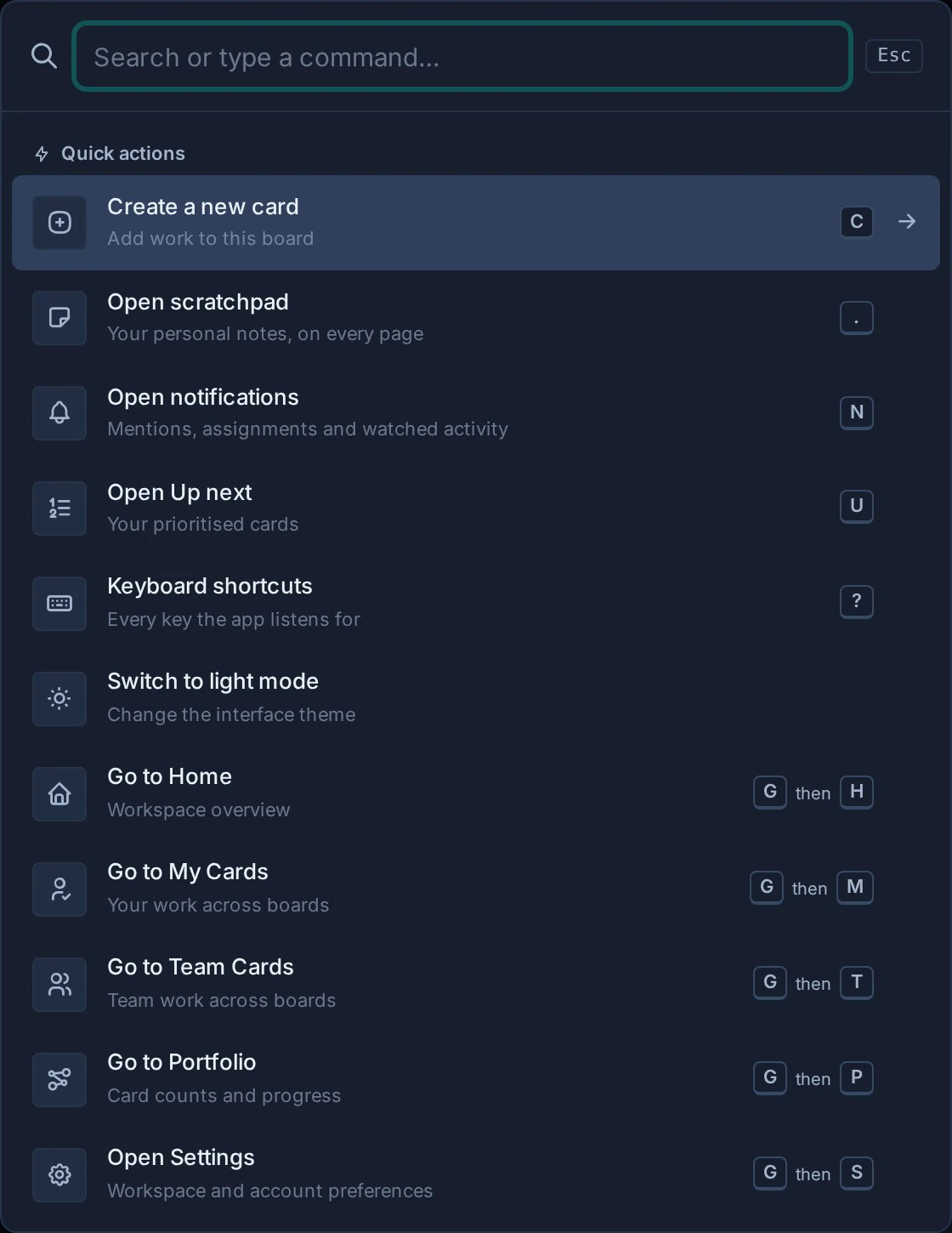
Open search
Select Find content in the sidebar, or use:
- Ctrl + K on Windows and Linux.
- Command + K on macOS.
The same shortcut works from boards, settings, notes, Home, and Global Work.
Press ? to see every shortcut available on the current screen. See Keyboard Shortcuts for the complete reference.
Use quick actions
Open global search and leave the search box empty to see Quick actions. You can:
- Open Scratchpad, Notifications, Up next, or the Keyboard shortcuts sheet.
- Mark all notifications as read when Kanera is online and unread notifications remain.
- Go to Home, My Cards, Team Cards, or Portfolio.
- Open Settings.
- Switch between the light and dark theme families while keeping your last-used theme in each family.
- Create a new card when you opened the palette from a board.
Use the arrow keys to move through actions and press Enter to run the highlighted action. Press Escape to close the overlay. As soon as you type a query, quick actions are replaced by grouped search results.
Search content
- Open global search.
- Enter a useful word or phrase.
- Review the grouped results.
- Select a result to open its card, note, comment, or attachment context.
Search can return:
- Card titles and searchable card content.
- Notes.
- Comments.
- Attachment filenames.
You can also enter a complete card key, such as PROJ-123, to open a specific card. Card-key matching is case-insensitive, and an exact key using a workspace's previous prefix still finds the card under its current key. Exact card-key matches are ranked first.
Results follow your Kanera access. Search does not expose work from a board, workspace, or organisation that you cannot open.
Get better results
- Search for a distinctive client, project, or feature name.
- Paste a complete card key when somebody gives you a reference such as
PROJ-123. - Use a filename fragment when looking for an attachment.
- Search for language used in a comment when the decision is not in the card description.
- Try a shorter phrase if a specific sentence returns nothing.
Search boards in the sidebar
The board filter narrows the navigation list by board or workspace name. Use it when you know where the work lives and only need to open the right board.
Use global search when you need to search the content inside the work.
Search inside card views
Search on a board and in Global Work matches card titles and current card keys. You can enter part of the current key, or an exact key that uses a previous workspace prefix. The same key search is available when reviewing completed cards and Work Done history.
Notification search also matches current card keys and exact keys that use a previous prefix, alongside its usual board, list, title, and checklist text.
Find cards waiting on prerequisites
Use Filter -> Blocked on a board or in Global Work to show active cards with open dependencies. This follows real card relationships, independently of any label or list named Blocked. Inside Dependencies -> Add, search by card title or key to link eligible work in the same workspace.
Troubleshooting
| Problem | What to check |
|---|---|
| A known item is missing | Confirm that your account still has access to its board or workspace. |
| An attachment does not appear | Search by its stored filename. File contents are not treated as attachment filenames. |
| Search has no results | Shorten the phrase or try a distinctive word from the title or body. |
| Quick actions are missing | Clear the search box. The actions only appear while the query is empty. |
| The shortcut does not open search | Select Find content directly and check whether the browser or operating system captured the shortcut. |