Roles and Permissions
An organisation is a top-level Kanera space for one person or a group. It contains its members, plan and billing settings where applicable, workspaces, and standalone boards. One account can belong to several organisations and hold a different role in each one. Within the active organisation, Kanera separates permissions into three layers: organisation roles, workspace roles, and board roles. A person's access is the combination of those layers, not one role reused everywhere.
The short version
Think of the roles as three questions:
| Layer | Simple question | Controls |
|---|---|---|
| Organisation role | Are they a member of this Kanera organisation, and can they manage its settings? | Billing, organisation settings, and organisation users. |
| Workspace role | Can they configure this workspace? | Workspace settings such as lists, labels, custom fields, automations, members, boards, and board access. |
| Board role | What can they do on this specific board? | Reading or editing cards, comments, checklists, and other board content. |
In practice, an internal teammate might be an organisation Member, a workspace Member, and an Editor on one board. That means they belong to the organisation, are available inside the workspace, and can work on that specific board.
Someone who should manage the workspace would be a workspace Admin. Someone who should only read one board would be a workspace Member with Observer access to that board.
Organisation roles
Organisation roles apply only to the organisation that grants them. Switching organisations can therefore change which settings, workspaces, and boards you can administer.
| Role | What it means |
|---|---|
| Owner | Full organisation control, including billing, organisation settings, and other organisation owners. |
| Admin | Can manage organisation users and settings. Organisation owners and admins can administer every workspace and board owned by the organisation. |
| Member | A standard organisation user. They can only enter workspaces and boards where access has been granted. |
Workspace roles
| Role | What it means |
|---|---|
| Admin | Manages workspace settings, lists, fields, labels, automations, members, boards, and board access. Automatically receives Editor access to every board in the workspace. |
| Member | Can belong to the workspace and use shared workspace context, but has no workspace-settings permissions. Must be explicitly added to each board they need. |
A workspace Member does not automatically get access to every board. This lets one workspace keep shared lists and fields while limiting sensitive boards to the people who need them.
Organisation owners and admins inherit workspace-administration access. Their inherited board access cannot be downgraded or removed from an individual board.
Board roles
| Role | What it means |
|---|---|
| Editor | Can create, edit, move, complete, archive, and delete board content, including cards and comments. |
| Observer | Read-only access to the board and the cards they are allowed to see. |
Board roles apply to both internal workspace members and external guests. There is no board-level Admin role: board access is managed by workspace admins and organisation admins.
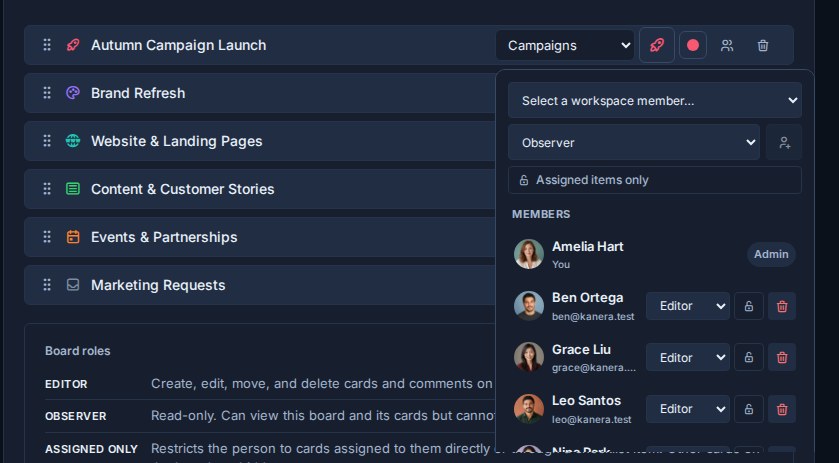
Board roles can be managed from Workspace settings -> Boards by opening the people icon beside a board.
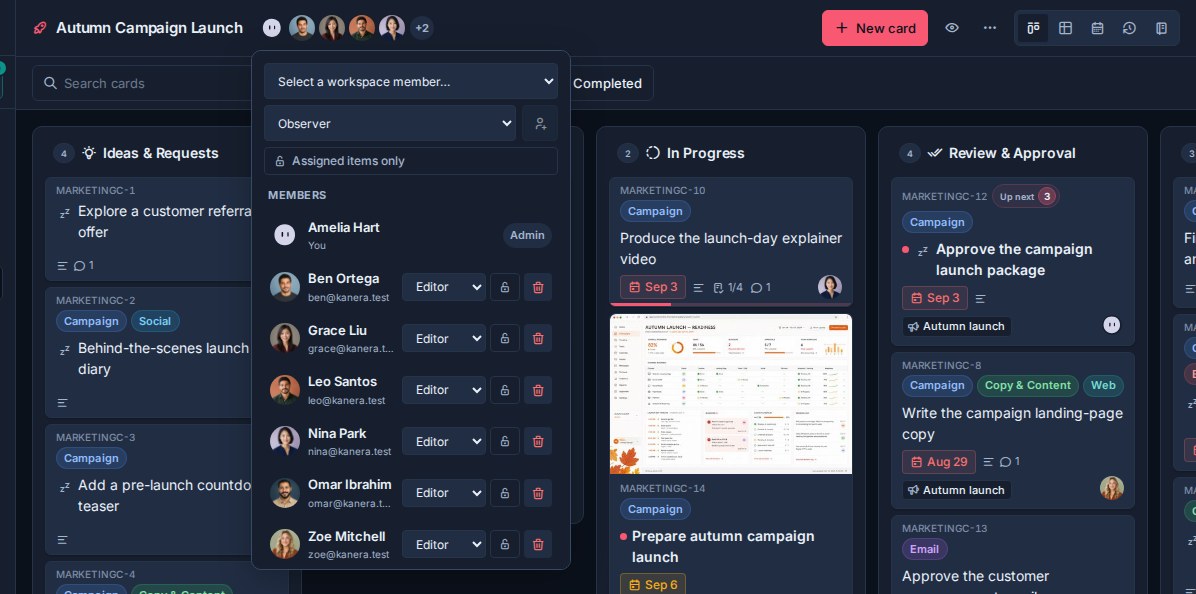
The same role menu is available on each board from the board members control in the board header.
Assigned items only
Assigned items only is a separate restriction that can be combined with either Editor or Observer.
When enabled, the person can only see cards where they are:
- A card assignee, or
- Assigned to at least one checklist item on the card.
A restricted Editor can edit the assigned cards they can see. A restricted Observer can only read those cards. Restricted Editors can create a card; Kanera assigns the new card to them so it remains visible.
This restriction filters card content throughout Kanera, including board views, Home, Global Work, search, activity, notifications, exports, and completed work. Some whole-board views that cannot safely represent a filtered board, such as Calendar and Work Done, are unavailable while the restriction applies.
Manage permissions
Workspace admins and organisation admins manage the layers in different places:
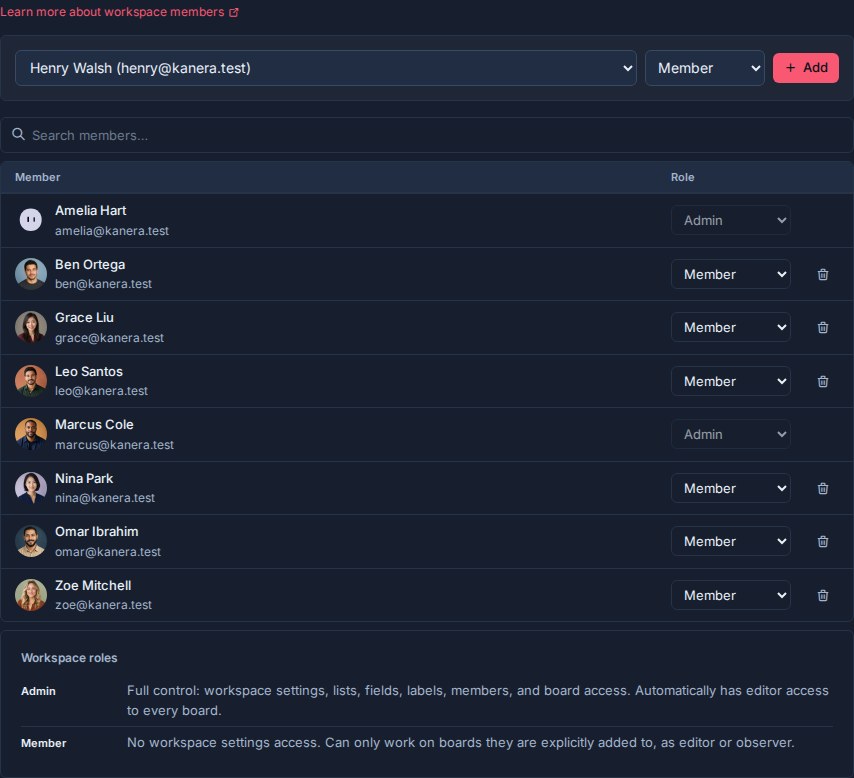
- Workspace settings -> Members: add organisation users and choose Workspace Admin or Member.
- Workspace settings -> Boards -> Manage access: add internal workspace members to a board, choose Editor or Observer, toggle Assigned items only, change access, or remove access.
- Workspace settings -> Guests: invite an external guest to a board with a board role and optional Assigned items only restriction.
The same board access menu is also available from a board's member control. Permission changes take effect immediately; a person may be prompted to reconnect while Kanera refreshes restricted realtime access.
Choosing permissions
| Need | Suggested access |
|---|---|
| Manage workspace configuration and access | Workspace Admin |
| Work on selected boards | Workspace Member + Editor on those boards |
| Read selected boards | Workspace Member + Observer on those boards |
| Work only on cards assigned to them | Editor + Assigned items only |
| Review only assigned cards | Observer + Assigned items only |
| External collaborator | Guest with Editor or Observer on selected boards |
Give people the narrowest access that lets them do their job. Use a workspace role for workspace administration and a board role for day-to-day content access.