MCP technical reference
Use this page when you need transport details, static credentials, capability boundaries, or protocol troubleshooting. For the shortest personal setup, start with Connect Kanera to your AI agent.
Connection methods
| Connection | Authentication | Effective access |
|---|---|---|
| Interactive OAuth | Browser sign-in and consent | Acts as the connected user with Read and Write tool capability. The client controls action availability and approval; Kanera enforces the user's board role. It never receives workspace administration access. |
| Device authorization | A short user code approved in a browser on any device | Acts as the approving user, exactly like interactive OAuth. It never receives workspace administration access. |
| Unattended agent | OAuth client_credentials | Uses a workspace service identity capped at the Read, Write, or Admin maximum chosen by an administrator. Admin currently adds no tools to the default MCP server; use a separate workspace or board API key for direct REST administration. |
| Personal API key | Static bearer token | Acts as its owner across accessible boards. The default MCP remains work-focused; direct REST requests separately inherit the owner's supported permissions. |
| Workspace or board API key | Static bearer token | Stays pinned to its standard workspace or standalone board and its Read, Write, or Admin scope. Admin does not add configuration tools to the default MCP. |
See Connect an AI agent for interactive OAuth, consent, revocation, unattended agents, and the authorization flow.
Hosted endpoints
Kanera's hosted MCP endpoint is:
https://mcp.kanera.app/mcp
The service health check is:
https://mcp.kanera.app/health
OAuth-capable clients can add the MCP endpoint directly and complete authentication in the browser. A client using an API key sends it as a bearer token:
Authorization: Bearer kanera_live_...
If your team runs Kanera at its own address, the same /mcp and /health paths apply there. Copy the exact MCP address shown under Profile settings -> API keys in that Kanera.
Protocol versions
The hosted endpoint serves both the current MCP protocol and the earlier revisions that Claude, Codex, Cursor, Copilot, Gemini CLI, and OpenCode use today, from the same server. Older clients see the same tools, resources, and prompts as before; clients on the current protocol also get event subscriptions. Tool schemas are published in the same JSON Schema dialect for both, so no client sees a different contract. kanera mcp over stdio accepts both as well.
OAuth token safety
OAuth-capable clients handle the security details automatically. The token issued for a Kanera connection works only with the MCP address shown by Kanera; it cannot be reused as a general public API credential.
If you are building a custom OAuth client, send that exact MCP address as the resource during authorization and every token exchange. The device-authorization examples below show where it belongs. Use a personal, workspace, or board API key for an integration that calls the REST API directly.
Device authorization for CLI and headless clients
A client that cannot receive a browser redirect, such as a terminal tool, an SSH session, or a machine with no usable browser, can connect with the OAuth device authorization grant (RFC 8628). The client shows a short code, a person approves it in a browser on any device, and the client polls until it receives tokens.
The result is the same identity as interactive OAuth. The connection acts as the approving user with Read and Write tool capability, while Kanera continues to enforce that user's role on every board. It never receives workspace administration access. Approving a device request needs a plan that allows agent connections, the same requirement as any other agent connection.
Kanera advertises the flow in /.well-known/oauth-authorization-server:
| Metadata field | Value |
|---|---|
device_authorization_endpoint | https://api.kanera.app/oauth/device/code |
grant_types_supported | Includes urn:ietf:params:oauth:grant-type:device_code |
Register a device client
Register the client at /oauth/register with the device grant type. A device-only client does not need a redirect URI; redirect_uris is required only when the client also uses authorization_code.
curl -X POST https://api.kanera.app/oauth/register \
  -H 'content-type: application/json' \
  -d '{
    "client_name": "Acme CLI",
    "grant_types": ["urn:ietf:params:oauth:grant-type:device_code", "refresh_token"]
  }'
Kanera rejects the device flow for any client that was not registered with the device grant type.
Request a device code
curl -X POST https://api.kanera.app/oauth/device/code \
  -d client_id=kanera_client_... \
  -d resource=https://mcp.kanera.app/mcp \
  -d 'scope=kanera:read kanera:write offline_access'
resource is required and must match the MCP address. Kanera normalizes every user-authorized device request to kanera:read kanera:write, including clients that omit scope or request only Read. Kanera issues a refresh token when the client registered the refresh_token grant type; offline_access is accepted but not required. Only kanera:read, kanera:write, and offline_access are accepted.
| Response field | Meaning |
|---|---|
device_code | The secret the client sends back when polling. |
user_code | The short code the person types, formatted like ABCD-2345. |
verification_uri | The /oauth/device page on your Kanera web address. |
verification_uri_complete | The same page with the code pre-filled in the query string. |
expires_in | 600. The request expires ten minutes after it is issued. |
interval | 5. The minimum number of seconds between polls. |
Approve the request
- The client displays the
user_codeand theverification_uri, or opensverification_uri_completedirectly. - The person opens that address and signs in to Kanera if they are not already.
- The page names the client, shows the code so it can be checked against the terminal, and lists what the client will be able to do.
- Choosing Allow access approves the connection. Choosing Deny rejects it.
Poll for tokens
curl -X POST https://api.kanera.app/oauth/token \
  -d grant_type=urn:ietf:params:oauth:grant-type:device_code \
  -d device_code=kanera_device_... \
  -d client_id=kanera_client_... \
  -d resource=https://mcp.kanera.app/mcp
Poll no faster than interval. Until the request completes, the token endpoint returns 400 with a standard OAuth error:
| Error | Meaning | What the client should do |
|---|---|---|
authorization_pending | Nobody has approved or denied the request yet. | Keep polling at the current interval. |
slow_down | The client polled faster than the interval. | Kanera adds five seconds to the interval. Use the longer interval from now on. |
access_denied | The person denied the request. | Stop polling and start a new request. |
expired_token | The code expired, or its tokens were already issued. | Start a new request. |
invalid_grant | The device code is unknown or belongs to another client. | Start a new request. |
After approval the endpoint returns the same payload as every other grant: an audience-bound kanera_mcp_... access token valid for fifteen minutes, plus a refresh token when the client registered the refresh_token grant type. A device code is single-use, so a repeated exchange returns expired_token. Refresh requests must include the same resource.
Manage or revoke a device connection where every other agent connection is managed, under Profile settings -> API keys.
Create an API key
Use API keys for local stdio, clients that only accept static bearer tokens, or custom server-side integrations.
Personal API key
- Open Profile settings.
- Go to API keys.
- Create a personal API key.
- Choose Read-only or Read and write. Read-only is the right default for an unattended agent: Kanera refuses every mutation at the API, so the client's tool permissions are not the only thing standing between an agent and your work. A client connected with a read-only key is only offered the read tools, so it never plans a change it cannot make.
- Add an optional private label that identifies the client.
- Copy the secret when it is shown.
A personal key has a prefix such as kanera_u_live_.... It is shown once and acts as its owner, capped by the scope you chose. Store it only in the AI client's credential store or your server's secret manager.
Workspace or board API key
- Open the standard workspace or standalone board.
- Go to Settings -> API.
- Create an API key.
- Choose the smallest scope that fits the workflow.
- Copy the secret when it is shown.
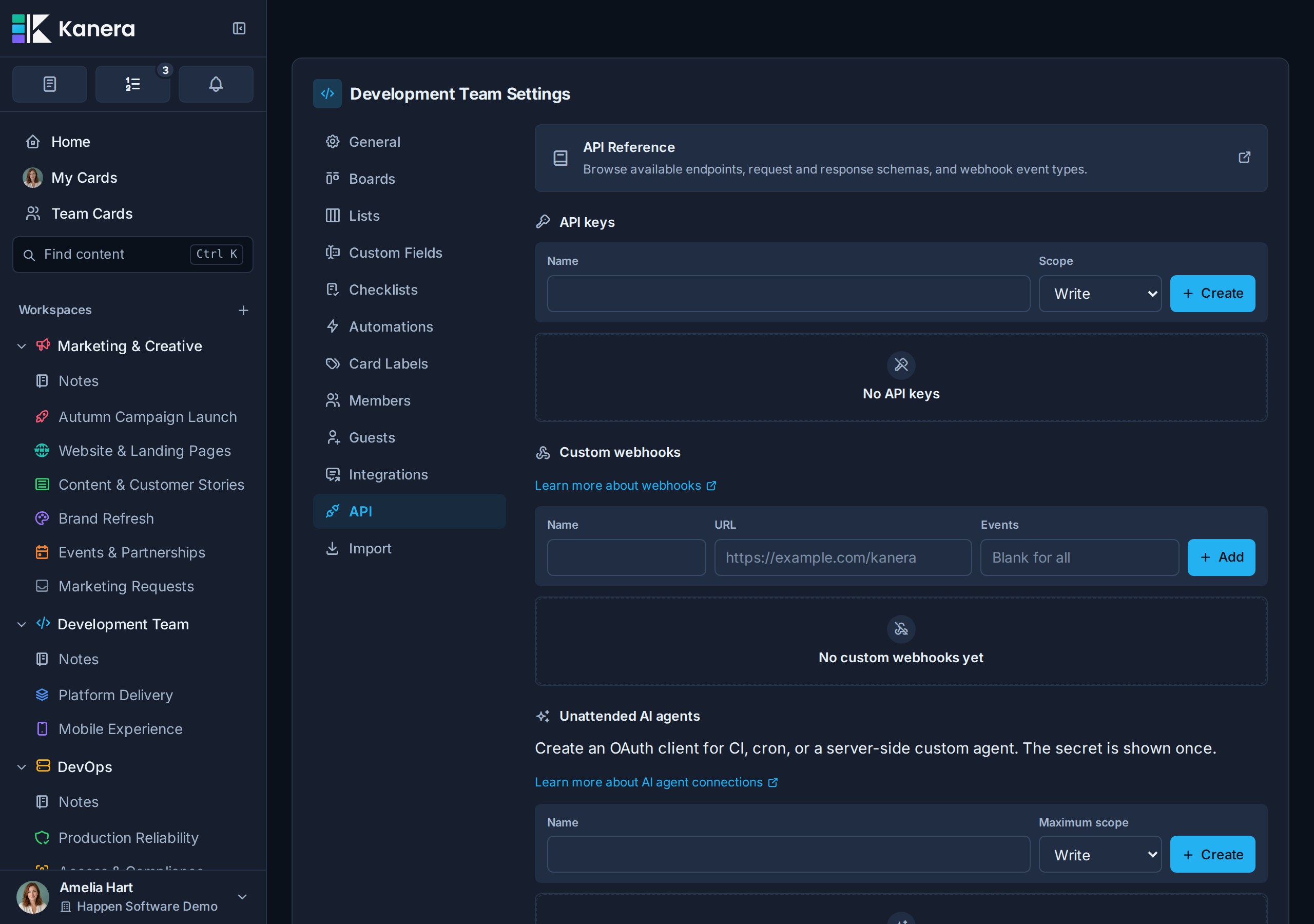
| Scope | Grants |
|---|---|
| Read | Inspect, search, summarize, and report without changing Kanera. |
| Write | Create and update board content, including cards, checklists, comments, assignments, labels, custom field values, and notes. |
| Admin | Perform supported direct public API administration. The default MCP server remains work-focused and exposes no workspace, board, list, label, field, option, retention, or ordering administration tools. |
Connect a local stdio client
The simplest local stdio server is the Kanera CLI. Install it, log in once, and point the client at kanera mcp; it serves the same tool layer over stdio using the stored credential, so there is no second key to configure in a second place.
npm install --global @kanera/cli
kanera auth login
{
  "mcpServers": {
    "kanera": {
      "command": "kanera",
      "args": ["mcp"]
    }
  }
}
Use npx @kanera/cli mcp instead of a global install when you would rather not install anything, and add "args": ["mcp", "--profile", "agent"] to pick a named profile.
To supply the credential through the environment rather than a stored profile — the usual choice in CI or a sandboxed agent — both the CLI and the standalone MCP package read:
| Environment variable | Purpose |
|---|---|
KANERA_API_KEY | A personal, workspace, or board API key. |
KANERA_PUBLIC_API_URL | The Kanera public API origin, such as https://api.kanera.app. |
{
  "mcpServers": {
    "kanera": {
      "command": "npx",
      "args": ["-y", "@kanera/cli", "mcp"],
      "env": {
        "KANERA_API_KEY": "kanera_u_live_...",
        "KANERA_PUBLIC_API_URL": "https://api.kanera.app"
      }
    }
  }
}
Use the hosted HTTP endpoint when you do not need to run the MCP process locally at all.
Resources
Kanera provides four structured JSON resource templates:
| Resource | URI | Contains |
|---|---|---|
| Standard workspace | kanera://workspace/{workspaceId} | Bounded workspace configuration and shared lists, labels, fields, templates, automations, and membership visible to the credential |
| Board | kanera://board/{boardId} | Bounded metadata and visible configuration for a standard-workspace or standalone board, without cards |
| Card | kanera://card/{cardId} | Card detail, including labels, assignees, checklists, attachments, and linked notes |
| Note | kanera://note/{noteId} | A visible personal or team note |
Personal notes are private to the connected user. Do not imply that another workspace member or a workspace service credential can read them.
Card references
MCP card fields named cardId or cardIds accept any of these references:
- A human card key such as
PROJ-123, including an exact key that uses a previous workspace prefix. - A canonical Kanera card URL.
- The card UUID returned by the public API.
Use the human key in prompts and user-facing replies. Kanera resolves it to the UUID before calling the existing public API operation, so authorization, activity, and audit behavior stay the same. A resolved key is remembered for the connection for a few minutes, so repeating it across a multi-step task does not repeat the lookup. If the connected user can see the same key in more than one organisation, use the canonical card URL to identify the intended organisation unambiguously.
Card results include the current human-readable key. The kanera://card/{cardId} resource URI continues to use the UUID; human keys and links apply to MCP tool inputs.
Capability groups
The live tool schemas are the authority for names, inputs, safety annotations, and limits. The server currently covers:
| Area | Available operations |
|---|---|
| Discovery | Inspect the acting session, page standard workspaces and accessible boards, read bounded workspace or board configuration, and page boards and members |
| Configuration boundary | Read lists, labels, fields, options, members, and permissions needed to target work. Create, edit, reorder, retention, and other list/workspace administration operations remain in the Kanera interface and are not MCP tools |
| Search | Search live cards, notes, comments, and attachment filenames, or search the official Kanera documentation |
| Cards | Read summaries or full content, fetch bounded checklist/comment content for up to 200 selected cards, create, update, move, reorder, copy, move between compatible boards, archive, unarchive, complete, reopen, and manage attachments and covers |
| Card relationships | Read individual links with cards.get, explore chains with cards.dependency_graph, and add or remove blocks, blocked_by, or relates_to links with cards.set_relations |
| Attachments | Read an attachment's contents with cards.get_attachment (images as images, text files as paged text); attach a file from the agent's own disk with cards.create_upload_link, which returns a one-time URL the agent uploads to with curl -T |
| Board separators | Create titled, optionally colored separators; update their appearance; move them relative to cards, separators, or list edges; place cards relative to separators; and delete separators without changing cards |
| Bulk card work | Complete, date, label, assign, move, archive, copy, or set custom fields on selected cards, with board-level batch limits exposed in each schema |
| Assignments and fields | Replace assignees or labels and set or clear supported custom-field values |
| Comments | Page, add with optional attachments, edit, delete an eligible comment, and idempotently add or remove reactions |
| Checklists | Read a card's checklists as a nested tree with IDs; create a checklist together with its items, assignees, due dates, and one level of sub-checklists in one atomic call; add one or more items at a chosen position; update one or more items with different changes per item; set one assignee or due date on every item; rename, reorder, move, and delete. Batches are validated in full before anything is written, and errors name the exact field |
| Up next priorities | Discover readable personal and teammate queues, read exact rank order, and add, move, or remove assigned active cards when the credential and workspace authority allow it |
| Agent runs | Announce in-flight work on a card with runs.start, report progress and heartbeat with runs.update, close the run with a terminal status, and check what is already running with runs.list |
| Work and reporting | Query bounded personal or visible team cards with overdue, unassigned, inactivity, and last-moved filters; read the connected user's whole day in one call with work.my_day; inspect Timeline schedules and cross-board rollups with work.portfolio_summary; and generate personal standup evidence across accessible boards |
| Activity and completed work | Page board activity and card history, and read completion history and work-done records |
| Notes | Page note metadata, read full content, create, update, link, attach small files, copy, and reorder personal or team notes |
| Scratchpad | Capture "remind me to…" items to your private Scratchpad Inbox without choosing a board, list and read pages, and tick items off. Needs a browser sign-in or personal key |
See the generated MCP tool inventory for every registered tool name.
Card relationships
cards.get includes the card's relations and hiddenBlockerCount. cards.set_relations adds or removes relationships in the same workspace:
{
  "cardId": "WEB-18",
  "direction": "blocked_by",
  "otherCardIds": ["MKT-42", "MKT-43"],
  "remove": false
}
direction is blocks, blocked_by, or relates_to, read from cardId's side. otherCardIds accepts one card reference or up to 50; remove defaults to false. Adds are idempotent and commit per target. A partial success returns failed entries and any notAttemptedCardIds beside the resulting relationships. If the final read fails, addedCardIds and relationsUnavailable report what was saved. The call errors when every attempted change is refused. Removal commits per target too: removedCardIds preserves successful removals beside any failed, notAttemptedCardIds, or relationsUnavailable details. notFoundCardIds names relationships it cannot see or find; those are left alone.
A write-capable credential needs edit access to cardId and any card that becomes blocked, and read access to the other cards. Cycles, self-links, cross-workspace links, and completed cards as new blockers are rejected. Reads omit inaccessible card details but count hidden active blockers. Use filters: { blockedOnly: true } with work.query_cards for blocked open cards, or atRiskOnly: true for open cards whose visible blocker is overdue or due after them; work.portfolio_summary reports both counts; subscribe to card.blocked and card.unblocked for transitions. These events work independently of configured automations.
Completing through MCP does not show an interactive blocked-work warning. Read the relationships first when deciding whether work is ready. A blocked agent run (runs.update with status: "blocked") describes that run and does not create a card dependency. See Card Relationships and Blocking.
Dependency graphs
cards.dependency_graph answers what blocks a card, what it holds up, and which work is connected across a board or workspace. Pass exactly one of cardId (key, UUID, or canonical URL), boardId, or workspaceId:
{ "cardId": "MKT-42" }
The tool returns expanded cards, edges, and truncated. Cards include their key, title, URL, source board/list names, inScope, and available dates, labels, and assignees. openBlockerCount includes active blockers the caller cannot see; offMapBlockerCount counts active blockers absent from this map. Only present, nonzero optional values are included. A blocks edge runs from sourceCardId to targetCardId.
A card scope also returns focus: blockedBy and blocks are direct connections; upstream and downstream are transitive card IDs in nearest-first order; relatedTo lists contextual links. onMap: false means the requested card was completed, archived, unrelated, or otherwise absent from the graph. Absence is not proof that a card has no relationships.
The graph follows blocking links both ways through readable open cards. Completed prerequisites can appear, but traversal does not continue through them. Hidden cards are counted without being named or used to bridge to other work. Related neighbours are included one hop from the scope's open seeds. The response stops at 400 cards and sets truncated; narrow the scope for more detail. This is a read tool. Use cards.set_relations to edit links and dependency events to monitor changes.
Dates
Date inputs accept YYYY-MM-DD or everyday phrases, resolved in your own time zone from your Kanera profile: today, tomorrow 1pm, friday (the next Friday, today included), next friday (a week after that), in 2 weeks, next month, end of week, end of month, or oct 12. session.get returns your timeZone and today so an agent can show you the date it worked out. Kanera due dates use time slots rather than exact times, so a time picks the matching slot: up to 09:00 is Morning, up to 13:00 Afternoon, up to 17:00 End of work day, and anything later the all-day slot. A phrase Kanera cannot read is refused with the accepted forms rather than guessed.
Result order
Each list tool's description states the order its results come back in, for example "newest first" for comments and activity, display order for lists and checklists, and soonest due first for work.query_cards by default.
Timeline schedules and start dates
Use work.schedule with exactly one boardId or workspaceId. It reads the same working-day engine as the Timeline view, follows accessible connected chains across boards, and excludes completed and inaccessible cards. Display filters do not change the calculation.
| Result | Meaning |
|---|---|
cards[].plannedStart, plannedEnd, durationDays | The planned date range and its inclusive Monday–Friday duration. |
earliestStart, earliestFinish, latestStart, latestFinish | Dependency-constrained dates and the latest dates that preserve the chain's finish. |
slackDays, critical | Room to slip in working days, and whether connected work has no slack. Null slack means the calculation has no date anchor. |
conflicts[] | Conflicting open blockers, with blockerId, edgeId, kind, and working-day days. |
criticalEdgeIds | Relationships on the scheduling critical path. |
summary | Scheduled/unscheduled, conflict and critical counts, date range, projectedFinish, latestDue, and working-day slipDays against the latest due date. |
Pass startDateLocalDate to cards.create, cards.update inside changes, or each entry of cards.bulk_create. Use YYYY-MM-DD or a supported relative-date phrase resolved in the user's zone; null clears an existing start. A start has no time slot and cannot be after due. These writes require edit access and do not automatically move successor dates.
There is no hypothetical schedule input: propose a change from the current schedule, then apply and re-read it only when a saved change is intended. See worked planning examples and schedule event payloads. Disabled planning features return TIMELINE_DISABLED or DEPENDENCIES_DISABLED for operations that require them.
Event subscriptions
A client on the current MCP protocol can subscribe to card.created, card.updated, card.moved, and comment.created in a workspace, board, or card, to priorities.changed for the connected user's own Up next queue, and to my_day.ready for a weekday-morning briefing ping, and receive each occurrence at a verified HTTPS callback it controls. Subscriptions belong to the connection, last up to 24 hours per refresh, and are rechecked against the identity's current access before every delivery. See Subscribe to events for the catalog, verification, signing, retries, and error codes.
Built-in prompts
| Prompt | Use |
|---|---|
summarize_board_status | Inspect one board and summarize progress, blockers, stale work, and next actions. |
prepare_standup_update | Combine personal current work and paginated work history across accessible boards to draft a standup. |
draft_card_from_notes | Read a note and draft a card title and Markdown description without creating the card. |
Normal conversation prompts work even when an AI client does not expose MCP prompt templates.
Security and destructive operations
- Interactive and device-code OAuth always grant
kanera:readandkanera:write;offline_accessremains optional. The MCP client controls tool availability and approvals, and Kanera enforces board roles. Admin tools work only where the user holds the matching admin role: organisation admins can create workspaces and standalone boards, and workspace admins can add boards and manage automations. - Every OAuth flow binds its authorization, code, refresh family, and access token to the canonical MCP
resource. - Raw
kanera_mcp_...access tokens are accepted only by the MCP endpoint and are rejected by/api/v1; the MCP service uses a separate minute-lived internal delegation credential for public API calls. - Device authorization uses the same scopes and the same limits. A device code expires after ten minutes, can be exchanged once, and is only approved by a signed-in user who confirms the code shown by the client.
- Unattended agents and workspace keys are capped at their configured scope.
- Personal keys inherit their owner's current permissions and should be protected like the user's account.
- Read-scoped API keys and unattended service credentials cannot call protected mutations.
- API-key and MCP activity is recorded with its acting user or integration identity. An interactive OAuth agent is recorded as the agent acting for its user: comments and activity rows carry the agent's name and render as
via <agent>, and the user is notified about what their agent did rather than having it suppressed as their own action. A personal API key used by a script still acts as its owner. - Disconnecting OAuth or deleting an unattended agent revokes its active credentials.
- Use a separate credential per client so one connection can be revoked without affecting another.
Kanera MCP cannot delete:
- Boards
- Lists
- Labels or custom fields
- Notes
- Note attachments
Delete those manually in Kanera. MCP can archive or unarchive cards and can archive the active cards in a list.
Administration over MCP is limited to creating workspaces and standalone boards (organisation admins, using an interactive OAuth grant or a write-capable personal key), adding boards to a workspace, and creating, editing, enabling, and deleting automations (workspace admins). MCP cannot edit, reorder, or delete workspaces, boards, lists, labels, fields, options, members, or retention settings. Those operations remain in the Kanera interface; supported REST endpoints remain available for deliberately built integrations.
MCP can permanently delete:
- A comment authored by the acting user
- A checklist and its items
- A checklist item
Those tool schemas are marked destructive. Use them only after an explicit request and verify the target before calling them.
Troubleshooting
| Problem | What to check |
|---|---|
| The client cannot connect | Use the exact /mcp URL for the Kanera you are connecting to, as shown under Profile settings -> API keys. |
| The client asks for a token instead of opening Kanera | It does not support remote MCP OAuth. Use an API key or a supported client. |
| The client has no browser to redirect to | Use device authorization if the client supports it, or an API key if it does not. |
Polling keeps returning slow_down | Poll no faster than the interval returned with the device code, and adopt the longer interval after each slow_down. |
| The device page reports an invalid or expired code | Codes last ten minutes and work once. Check the code, sign in first, then request a new code from the client. |
The token endpoint returns invalid_target | Send the exact MCP address from Profile settings -> API keys as resource during authorization and every token exchange. |
| The API key is reported missing | Set KANERA_API_KEY for stdio or send Authorization: Bearer ... over HTTP. |
A request returns 401 | The credential is missing, malformed, expired, revoked, or copied incorrectly. Restart OAuth or replace the API key. |
A request returns 403 | For personal OAuth, confirm the acting user is an Editor rather than an Observer on the target board. For an API key or unattended agent, also confirm the credential is Write-capable. |
| The agent can read but not edit | Allow the write action in the MCP client and confirm the acting identity has board Editor access. For service connections and API keys, also use a Write-capable credential. Existing personal OAuth connections do not need to reconnect. |
| The agent cannot find a board | Use complete board discovery. A board may be standalone or available only through explicit guest membership. |
| The agent cannot administer a workspace | MCP covers only creating workspaces and boards and managing automations, and only where the acting identity is an admin; workspace-scoped and read-only credentials cannot create workspaces. For other administration, use the Kanera interface or a supported public REST endpoint. |
| A coding agent has tools but uses them poorly | Install the official Kanera Agent Skill. |
| New or changed tools do not appear | Refresh or rescan the MCP server in the client so it retrieves the current schemas. Restart the client if it has no refresh action; OAuth reauthorization is not normally required. |
| The client cannot subscribe to events | Events need the hosted /mcp endpoint and a client on the current MCP protocol; a stdio kanera mcp server never offers them. See Subscribe to events for callback and scope errors. |