Webhooks
Webhooks let external systems react when work changes in Kanera.
Use webhooks when another system should know about changes without polling the API constantly. Common examples include:
- Update an external dashboard.
- Sync changed cards to another system.
- Trigger deployment or review workflows.
- Record Kanera activity in an audit system.
To post card activity into a team chat channel, you do not need a webhook of your own. Kanera has built-in Chat Destinations for Slack, Discord, Telegram, and Zulip that format each message for the platform. Use a webhook when you need the full event catalog, exact payloads, and signature verification.
Workspace admins can create webhook endpoints from Workspace settings -> API, in the Custom webhooks section. Standalone boards have the same API tab in their own board settings. Integrations can also register endpoints through the public API or TypeScript SDK.
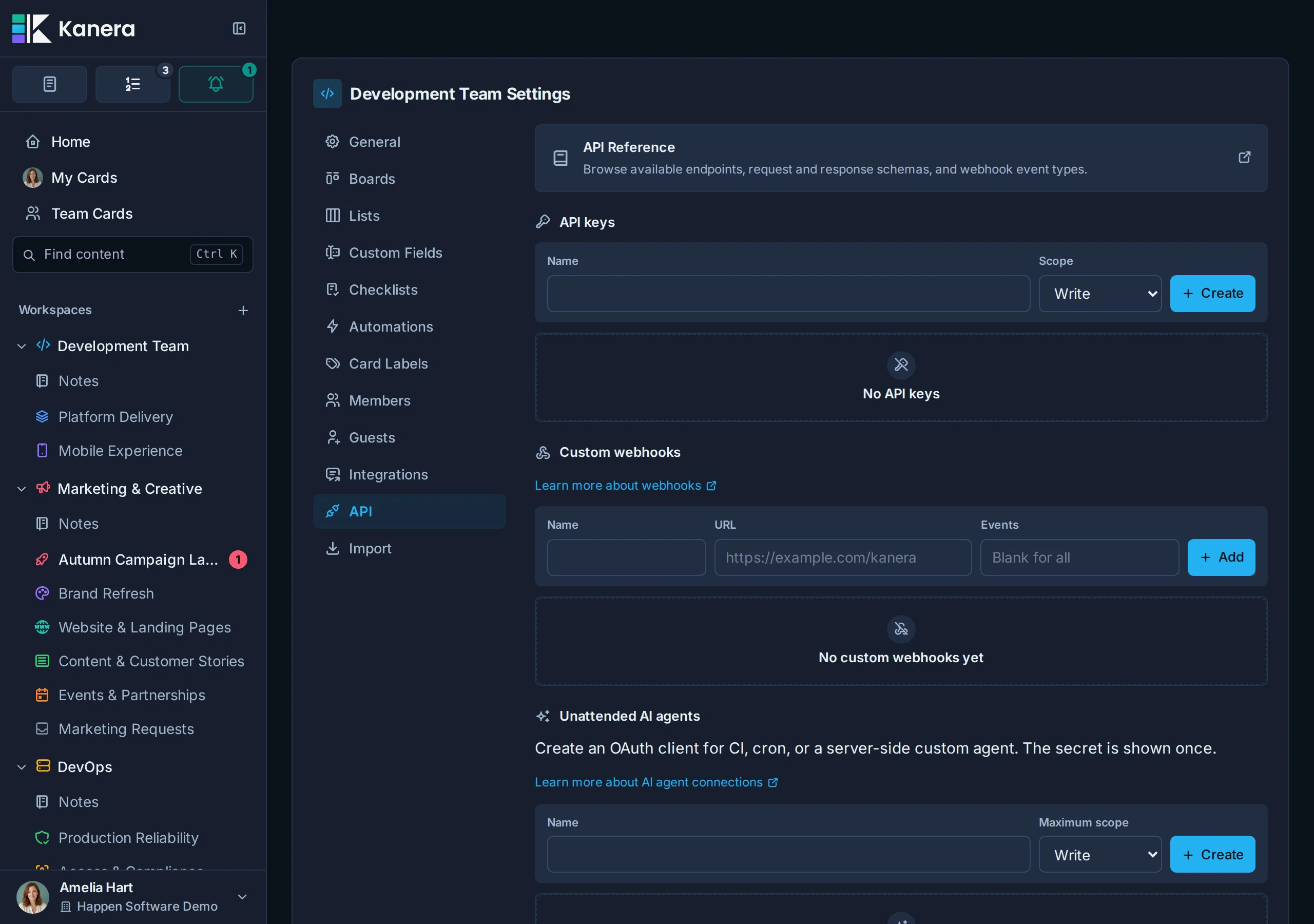
Each webhook destination can receive all events or only selected event types. Leave eventTypes empty to receive every event, or provide one or more of the event type strings below.
Plan and permissions
- Workspace admins can see and manage every generic webhook endpoint in that workspace.
- A write-capable API credential or interactive OAuth agent can register an endpoint without admin authority when its user is a workspace member. That endpoint is scoped to the creating connection: only the same connection and workspace admins can see or manage it. Read-scoped credentials cannot manage webhooks.
- Webhooks need Pro or the 30-day Pro trial. They are not available on hosted Free.
- On hosted Free the create form is replaced by Webhooks aren't available on your plan.
Revoking the credential or agent connection also removes its connection-scoped endpoints. Admin-created workspace endpoints remain until an admin deletes them.
What happens on a downgrade
When a hosted organisation moves from Pro or a trial to Free, Kanera pauses every enabled webhook endpoint rather than deleting anything. It also revokes workspace API keys (personal keys keep working), and disables automations beyond the Free limit.
| On hosted Free | Behaviour |
|---|---|
| Existing endpoints | Automatically paused, and they cannot be re-enabled while the organisation is on Free. |
| New activity | Does not reach your endpoint. |
| Anything still waiting to send | Recorded as failed with webhooks are unavailable on the current plan rather than sent late. |
| A failed delivery | Cannot be retried manually. |
| Configuration and history | Kept. Endpoints, event selections, secrets, and delivery history are all still there. |
Upgrading back to Pro re-enables the endpoints that were paused by the downgrade and restores the workspace API keys it revoked, so a resumed integration does not need to be rebuilt.
Register an endpoint programmatically
The public API exposes the same generic-endpoint lifecycle used by Workspace settings. Every path below is relative to:
/api/v1/workspaces/{workspaceId}/webhooks
| Method | Path | Use |
|---|---|---|
GET | (base path) | List endpoints visible to the caller. |
POST | (base path) | Create an endpoint and return its signing secret once. |
PATCH | /{endpointId} | Change its name, URL, event filter, or enabled state. |
POST | /{endpointId}/secret | Rotate the signing secret. |
DELETE | /{endpointId} | Delete the endpoint. |
GET | /{endpointId}/deliveries | Read recent delivery attempts. |
POST | /{endpointId}/deliveries/{deliveryId}/retry | Retry one failed delivery. |
With the TypeScript SDK, use kanera.webhookEndpoints.create(), .list(), .update(), .rotateSecret(), .deliveries(), .retryDelivery(), and .delete(). The returned endpoint has scope: "workspace" for an admin-managed endpoint or scope: "connection" when a non-admin credential registered it. Store the secret returned by create or rotation immediately; later reads never expose it.
Webhook event types
The public API exposes the current list at:
https://api.kanera.app/webhook-event-types
| Area | Event types |
|---|---|
| Lists | list:created, list:updated, list:moved, list:rebalanced, list:deleted |
| Board separators | separator:created, separator:updated, separator:moved, separator:rebalanced, separator:deleted |
| Custom fields | customField:created, customField:updated, customField:moved, customField:rebalanced, customField:deleted |
| Custom field options | customFieldOption:created, customFieldOption:updated, customFieldOption:moved, customFieldOption:rebalanced, customFieldOption:deleted |
| Cards | card:created, card:updated, card:moved, card:rebalanced, card:deleted |
| Card custom fields | card:customFieldValue:set, card:customFieldValue:cleared |
| Card labels and assignees | card:labels:set, card:assignees:set |
| Card attachments | card:attachment:created, card:attachment:deleted |
| Card checklists | card:checklist:created, card:checklist:updated, card:checklist:moved, card:checklist:rebalanced, card:checklist:deleted |
| Card checklist items | card:checklistItem:created, card:checklistItem:updated, card:checklistItem:moved, card:checklistItem:rebalanced, card:checklistItem:deleted |
| Workspace card labels | cardLabel:created, cardLabel:updated, cardLabel:moved, cardLabel:rebalanced, cardLabel:deleted |
| Comments | comment:created, comment:updated, comment:deleted |
| Comment reactions | comment:reaction:added, comment:reaction:removed |
| Card feed | card:feedItem:created, card:feedItem:updated, card:feedItem:deleted |
| Boards | board:created, board:updated, board:moved, board:rebalanced, board:deleted |
| Board members | board:member:added, board:member:removed |
| Workspaces | workspace:updated, workspace:deleted |
| Workspace members | workspace:member:added, workspace:member:updated, workspace:member:removed |
| Users | user:profile:updated |
| Notes | note:created, note:updated, note:moved, note:rebalanced, note:deleted, note:locked, note:unlocked |
| Agent runs | agentRun:started, agentRun:updated |
Payload format
Kanera sends each webhook as a JSON object with a stable envelope and event-specific data.
| Field | Meaning |
|---|---|
id | Unique webhook event id. This matches X-Kanera-Event-Id. |
type | Event type, such as card:created. |
workspaceId | Workspace where the event occurred. |
boardId | Board where the event occurred, when the event is board-scoped. |
cardId | Card involved in the event, when the event payload identifies a card. |
occurredAt | ISO 8601 timestamp for when the event occurred. |
data | Full event payload. The shape depends on type and matches the corresponding realtime event payload. |
Agent-run events carry { boardId, cardId, run } in data, where run is the full agent run: its agentName, the userId it acts for, status, title, summary, externalUrl, and its startedAt, heartbeatAt, and endedAt timestamps. agentRun:updated fires on every heartbeat as well as on a status change, so key your handler on run.status rather than treating each delivery as new work. A run that stops heartbeating arrives as one final agentRun:updated with status: "stalled".
Example card:created payload:
{
  "id": "7e5c982a-e6c9-4ea7-9647-b14fe73ed50a",
  "type": "card:created",
  "workspaceId": "a069fd45-3bb3-4928-bac9-cb574a050d20",
  "boardId": "48a52a55-763e-4c64-8a76-51ac56247f5c",
  "cardId": "70c39cef-1aec-44e6-a8f5-f36f765a818d",
  "occurredAt": "2026-05-28T12:34:56.000Z",
  "data": {
    "boardId": "48a52a55-763e-4c64-8a76-51ac56247f5c",
    "card": {
      "id": "70c39cef-1aec-44e6-a8f5-f36f765a818d",
      "boardId": "48a52a55-763e-4c64-8a76-51ac56247f5c",
      "listId": "3bb3c1b3-8fc7-4807-854d-2d5ff62df147",
      "title": "Prepare kickoff agenda",
      "position": "1000.0000000000"
    }
  }
}
Webhook delivery
Kanera sends webhook deliveries as JSON and includes headers you can use to verify the request:
| Header | Meaning |
|---|---|
X-Kanera-Event-Id | Unique event id. |
X-Kanera-Timestamp | Unix timestamp in seconds. |
X-Kanera-Signature | sha256= plus an HMAC-SHA256 signature. |
The signature is calculated over:
${timestamp}.${rawBody}
using the webhook endpoint secret.
Webhook deliveries are retried when the endpoint returns a non-2xx status or cannot be reached. Kanera records delivery history so you can review failures, retry deliveries, pause destinations, and rotate secrets from the workspace API settings.
Verify webhook signatures
Verify the signature before trusting the payload.
The TypeScript SDK does this for you, and throws rather than returning a boolean so a handler cannot forget to check:
import { parseWebhook } from "@kanera/sdk";

app.post("/kanera/webhook", express.raw({ type: "application/json" }), async (req, res) => {
  const event = await parseWebhook({
    secret: process.env.KANERA_WEBHOOK_SECRET!,
    payload: req.body,   // the raw bytes
    headers: req.headers,
  });
  // Handle event.type, event.workspaceId, event.boardId, event.cardId, and event.data.
  res.sendStatus(204);
});
To verify it yourself, compare the HMAC over {timestamp}.{body} in constant time. Note the length check: crypto.timingSafeEqual throws when the two buffers differ in length, which an attacker controls.
import crypto from "node:crypto";
import express from "express";

const app = express();

app.post("/kanera/webhook", express.raw({ type: "application/json" }), (req, res) => {
  const timestamp = req.header("X-Kanera-Timestamp") ?? "";
  const signature = req.header("X-Kanera-Signature") ?? "";
  const expected = "sha256=" + crypto
    .createHmac("sha256", process.env.KANERA_WEBHOOK_SECRET!)
    .update(`${timestamp}.${req.body.toString("utf8")}`)
    .digest("hex");

  const received = Buffer.from(signature);
  const digest = Buffer.from(expected);
  if (received.length !== digest.length || !crypto.timingSafeEqual(received, digest)) {
    return res.status(401).send("invalid signature");
  }

  const event = JSON.parse(req.body.toString("utf8"));
  // Handle event.type, event.workspaceId, event.boardId, event.cardId, and event.data.
  res.sendStatus(204);
});
Always verify against the raw request body. If your framework parses JSON before verification, the signature check may fail or become unreliable.
Kanera also sends X-Kanera-Timestamp and X-Kanera-Event-Id. Reject deliveries whose timestamp is outside a few minutes of now to bound replay, and use the event id to make your handler idempotent, since deliveries may be retried.
Related outbound options
Webhooks are the general-purpose path. Two narrower options exist for specific audiences:
| Path | Audience | Payload | Where to set up | Plan |
|---|---|---|---|---|
| Webhooks | Another system | Signed JSON across the whole event catalog | Workspace settings -> API | Pro or trial |
| Chat destinations | A team channel | Formatted messages for Slack, Discord, Telegram, or Zulip | Workspace settings -> Integrations | Pro or trial |
| Personal delivery channels | One person | ntfy, Gotify, or signed JSON for your own notifications | Profile settings -> Notifications | Pro or trial |
| MCP event subscriptions | An AI agent's host | Signed card and comment occurrences to a callback the agent verified | The agent subscribes over MCP; nothing to set up in Kanera | Every plan |
Chat destinations are managed separately from webhook endpoints and do not appear in the webhook list, so rotating a webhook secret never affects a chat destination.
An automation's Call a webhook action is targeted rather than subscription-based. It sends automation:webhook:called only to the endpoint selected on the rule, regardless of that endpoint's ordinary eventTypes filter, while keeping the same signature, retry, and delivery-history behaviour. See Automations.