Reminders
A reminder brings a card back to your attention at a time you choose. Use one when you need to follow up on something but it is not yours to own, or not yet due: chase a reply on Friday, check a client card next Monday, or look at a review again after lunch.
Reminders are private. Nobody else sees that you set one, it does not appear in the card's activity, and it changes nothing about the card. You can set a reminder on any card you can open, including cards on boards where you are an observer or a guest.
Set a reminder
Open the card and select the alarm button in the card header, or right-click the card on the board (or use its ⋯ menu) and choose Remind me… without opening it.
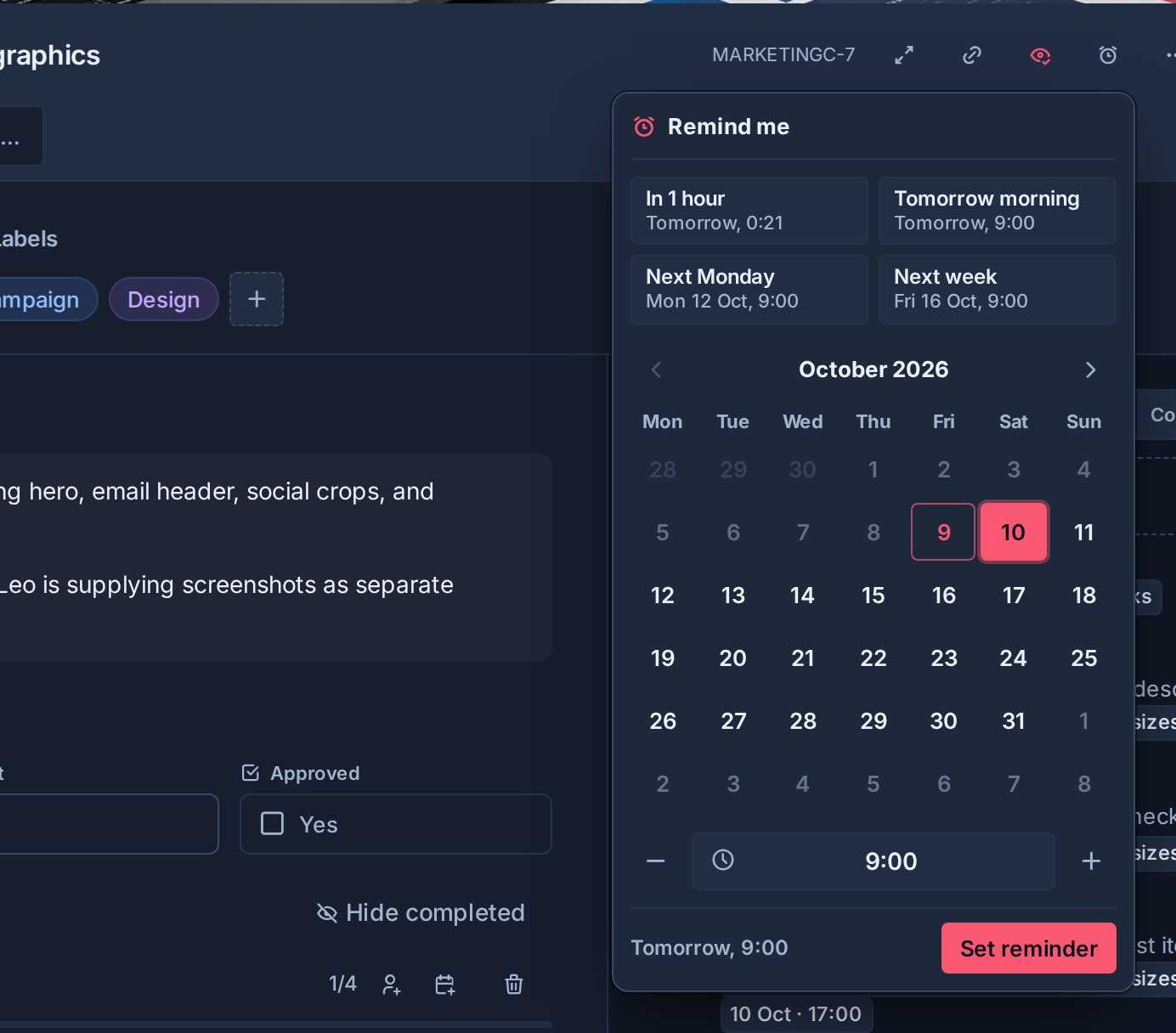
- Quick picks set the reminder in one click: In 1 hour, Later today (17:00, offered until 16:00), Tomorrow morning, Next Monday, or Next week. Each shows the exact time it will use. Morning picks use 9:00, the same time a "morning" due date means.
- Any other time: pick a day on the calendar, set the time, and select Set reminder. Type the time as
14:30,1430,2:30pm, or9am, or step it 15 minutes at a time with the − and + buttons or the arrow keys. The footer shows exactly when the reminder will fire.
Times use your browser's time zone, so the reminder fires at the moment you saw in the picker.
A reminder can be set from now up to eight weeks ahead. Days outside that window are greyed out on the calendar, and a time that has already passed cannot be saved.
Once a reminder is set, the alarm button is highlighted and the card's tile on the board shows a small alarm, so you can see at a glance which cards you will be reminded about. Hover the alarm button to see when.
See your reminders
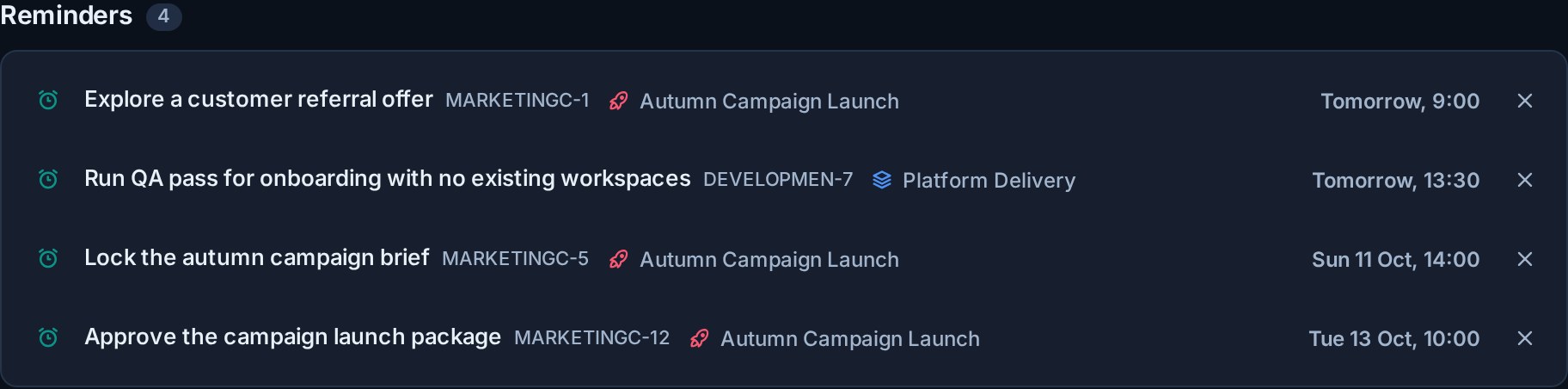
Home lists your upcoming reminders under Up next, soonest first, with each card's board and the time it will fire. Select a row to open the card, or the × to clear that reminder. The list updates as reminders are set, cleared, or fire, on any of your devices. It only appears when you have at least one, and shows the first five with Show all for the rest.
On a board, open Filter and choose Reminder set to show only the cards you set a reminder on. The filter is yours alone: everyone else's board is unaffected.
Change or clear a reminder
Each card holds one reminder per person. The card menu then reads Change reminder…. Open the alarm button or that menu item again to see when it is set for, then pick a new time to replace it, or select Clear to remove it.
Setting a new time on a reminder that has already fired arms it again.
Completing a card clears every reminder on it, yours and anyone else's, whether the card was completed by hand, in bulk, by an automation, or through a synced board. Reopening the card does not bring them back. Once the work is done there is nothing left to be reminded about.
When a reminder comes due
Kanera notifies you once, within about 30 seconds of the time you chose. The notification appears in the notification drawer with an alarm icon and a Your reminder label, so it stands apart from activity other people caused.
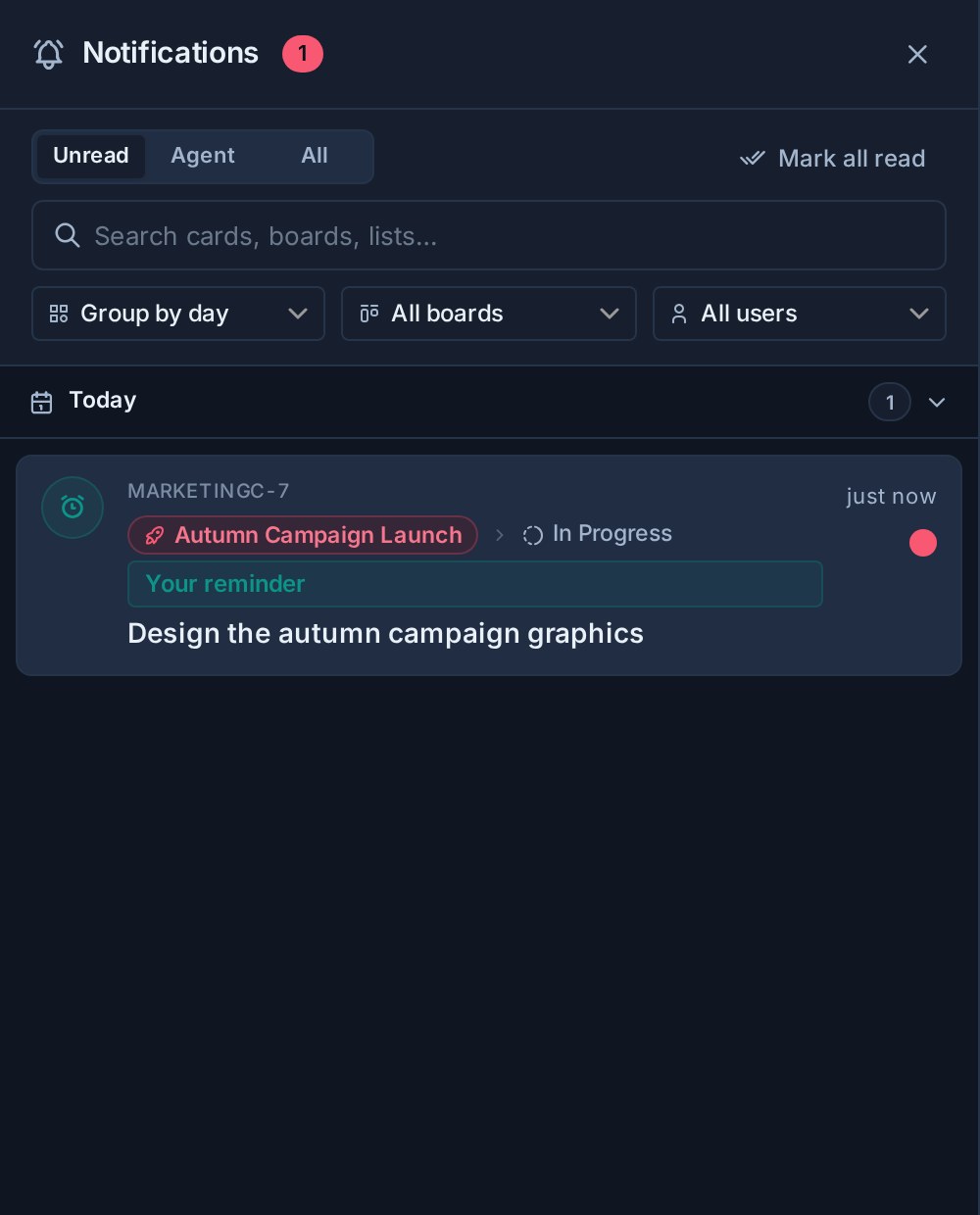
Select it to open the card. After it fires, the card's alarm and the highlighted button go back to normal.
The reminder can also reach you by email, browser push, ntfy, Gotify, or your own webhook. Choose which with the Your card reminders row in notification settings. Switching a channel off there never removes the drawer notification, and workspace rules apply to reminders like any other notification.
If the card has been archived, or you can no longer access it, by the time the reminder is due, it is dropped silently rather than notifying you about a card you cannot open.
Reminders from AI agents and the API
An AI agent connected to Kanera can set reminders for you in plain language, for example "remind me about MKT-42 on Friday at 3pm". It uses the cards.set_reminder tool, confirms the time it resolved, and the reminder appears in Kanera straight away. reminders.list shows what is pending. An agent can also subscribe to the reminder.due event to act when a reminder fires.
The same is available from the CLI (kanera remind MKT-42 "friday 3pm", kanera reminders), the SDK, and the API.
Because a reminder belongs to one person, it needs a personal API key or an OAuth connection. Workspace API keys cannot set reminders, and read-only keys can list them but not change them.
Reminders, watching, and due dates
| Need | Use |
|---|---|
| Come back to one card at a specific time | A reminder |
| Hear about every comment and move on a card | Watching |
| Agree when the work itself must be finished | A due date |
| Ask someone else for attention | Mention them in a comment |
A due date is shared with everyone on the card and drives overdue warnings. A reminder is only for you and leaves the card untouched.