Personal Delivery Channels
Personal delivery channels send your own Kanera notifications somewhere other than email or browser push.
Email and browser push work well for most people, but they are not the only useful destinations. Some teams already run a self-hosted notification server. Some people want alerts on a phone without granting browser notification permission. Some want Kanera events to land in a script, a home dashboard, or an on-call tool.
Kanera supports three personal destinations:
| Channel | What it is | Good for |
|---|---|---|
| ntfy | A notification server you subscribe to from a phone or desktop app, either ntfy.sh or your own instance. | Phone alerts without browser push, shared team topics, homelab setups. |
| Gotify | A self-hosted notification server with its own Android app and web UI. | Fully self-hosted alerting with no third-party push service in the path. |
| Personal webhook | An HTTPS endpoint you own, receiving signed JSON. | Scripts, dashboards, on-call routing, custom automation, chat bridges you already run. |
These channels are personal. They belong to your account, not to a workspace, and nobody else can see or change them. They do not depend on the organisation push setting or on browser notification permission.
They need Pro or the 30-day Pro trial. They are not available on hosted Free, where email, browser push, and the in-app drawer continue to work as normal. See Plan requirements below.
If you want a whole team to see card activity in a shared channel, use Chat Destinations instead. Personal channels are a private feed; chat destinations are a team feed and are set up by a workspace admin.
When to use each channel
Use ntfy when you want phone or desktop alerts and would rather not use browser push. Install the ntfy app, subscribe to a topic, and Kanera publishes to it. This is also the simplest option if you already publish other alerts to ntfy and want Kanera beside them.
Use Gotify when the requirement is that nothing leaves your infrastructure. Gotify runs on your own server, the Android app talks directly to it, and Kanera only needs the server URL and an application token.
Use a personal webhook when you want to do something with the notification rather than read it. Common uses:
- Route mentions and overdue cards into an on-call or paging tool.
- Post your assignments into a personal chat channel or a bot you already run.
- Append notifications to a log, a dashboard, or a personal database.
- Bridge Kanera into a notification provider Kanera does not support directly.
Plan requirements
Personal delivery channels need Pro or a Pro trial. Email, browser push, the in-app notification drawer, the daily digest, watching, and Workspace Rules are available on every plan and are not affected by this.
On hosted Free, Additional Notification Destinations shows ntfy, Gotify, and personal webhooks aren't available on your plan instead of the setup cards.
If an organisation moves from Pro or a trial to Free, Kanera switches each person's ntfy, Gotify, and webhook channels off. Nothing is deleted: server URLs, topics, tokens, signing secrets, and per-type preferences all stay saved, and anything still waiting to send is dropped rather than arriving late. Upgrading again turns back on exactly the channels each person had enabled, so no one has to reconnect anything.
Where to set them up
Open Profile settings -> Notifications and expand Additional Notification Destinations.
Each channel has its own card with connection fields, an Enabled toggle, notification type toggles, and Save, Test, and Remove actions.
A channel cannot be enabled until you have filled in everything it needs. What you allow here is the most a channel will ever send you: Workspace Rules can quieten a channel for one workspace, but never make it send more than these settings allow.
Your in-app notification drawer is never affected by these settings. It always shows the complete feed.
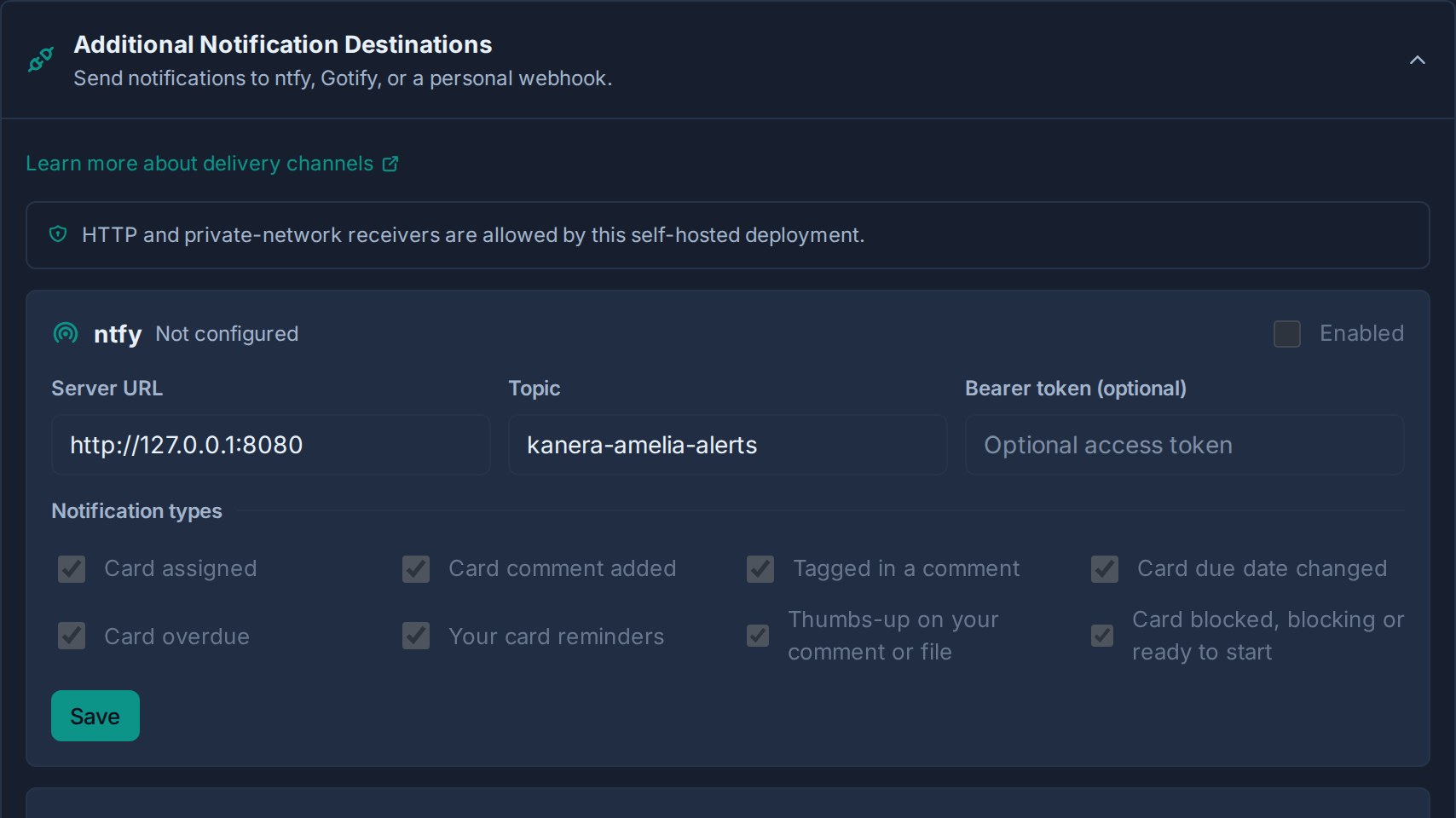
Set up ntfy
- Choose the server. Use
https://ntfy.shfor the public service, or your own instance such ashttps://ntfy.example.com. - Choose a topic name. Treat it as a secret on the public service, since anyone who knows a topic can subscribe to it. Something like
kanera-a7f3c2-ameliais better thankanera. - In Kanera, enter the Server URL and Topic. Leave the query string off the server URL; Kanera appends the topic itself.
- If the topic requires authentication, paste an access token into Bearer token. It is optional on open servers and required on protected ones.
- Click Save, then turn on Enabled.
- Choose which notification types this channel should deliver.
- Click Test and confirm the message arrives.
- Subscribe to the same topic in the ntfy app or web UI if you have not already.
Each notification arrives as a plain message with a title, and tapping it opens the card in Kanera.
Set up Gotify
- Open your Gotify web UI and create an application — for example, "Kanera".
- Copy the application token that Gotify generates. Application tokens start with
A. Do not use a client token. - In Kanera, enter the Server URL, such as
https://gotify.example.com, and paste the token into App token. - Click Save, then turn on Enabled.
- Choose which notification types this channel should deliver.
- Click Test and confirm the message appears in Gotify.
Messages appear in Gotify under the application you created, with the notification title, a readable summary, and a link that opens the card. They are sent at normal priority, so Gotify's own per-application settings decide how insistent the alert is.
The app token is stored encrypted and never displayed again; the field shows Saved — leave blank to keep. Use Remove token to clear it, or paste a new token and save to replace it.
Set up a personal webhook
- Prepare an HTTPS endpoint that accepts
POSTrequests with a JSON body and returns a 2xx status quickly. - In Kanera, enter the Endpoint URL and click Save.
- Kanera generates a signing secret and shows it once. Copy it now — it is not shown again.
- Store the secret in your receiver and verify every request before trusting it.
- Turn on Enabled, then choose which notification types this channel should deliver.
- Click Test and confirm your endpoint received and verified the request.
Use Rotate secret to issue a new secret. The old secret stops working immediately, so update your receiver in the same maintenance window.
Request headers
| Header | Meaning |
|---|---|
Content-Type | Always application/json. |
User-Agent | Kanera-Personal-Notifications/1.0. |
X-Kanera-Event-Id | Unique id for this delivery. Matches id in the body. |
X-Kanera-Timestamp | Unix timestamp in seconds. |
X-Kanera-Signature | sha256= plus an HMAC-SHA256 of ${timestamp}.${rawBody} using your signing secret. |
Payload
{
  "id": "0199c3ab-6f5e-7d21-9b0c-8b31a7e40f2d",
  "type": "notification",
  "occurredAt": "2026-07-30T09:14:22.481Z",
  "notification": {
    "kind": "comment_mentioned",
    "reason": "mentioned",
    "title": "Mentioned in a comment",
    "body": "Amelia mentioned you in Website Redesign / Prepare kickoff agenda: can you review the copy?",
    "url": "https://kanera.example.com/b/48a52a55-763e-4c64-8a76-51ac56247f5c/c/70c39cef-1aec-44e6-a8f5-f36f765a818d",
    "tag": "card:70c39cef-1aec-44e6-a8f5-f36f765a818d:mentioned"
  }
}
| Field | Meaning |
|---|---|
id | Delivery id, also sent as X-Kanera-Event-Id. Use it to make your receiver idempotent. |
type | Always notification for personal channel deliveries. |
occurredAt | ISO 8601 timestamp for when the notification was queued. |
notification.kind | Notification kind, such as card_assigned, card_comment_added, comment_mentioned, card_due_date_changed, card_overdue, card_reminder, or test. |
notification.reason | Why you were notified: assigned, comment, mentioned, dueDateChanged, overdue, reminder, or test. |
notification.title | Short headline. |
notification.body | Human-readable summary including the actor, board, and card. |
notification.url | Deep link to the card, when the notification points at one. |
notification.tag | Grouping key for collapsing repeat notifications about the same card. |
Verify the signature
import crypto from "node:crypto";
import express from "express";

const app = express();

app.post("/kanera/notifications", express.raw({ type: "application/json" }), (req, res) => {
  const timestamp = req.header("X-Kanera-Timestamp") ?? "";
  const signature = req.header("X-Kanera-Signature") ?? "";
  const expected = "sha256=" + crypto
    .createHmac("sha256", process.env.KANERA_NOTIFICATION_SECRET!)
    .update(`${timestamp}.${req.body.toString("utf8")}`)
    .digest("hex");

  const ok = signature.length === expected.length
    && crypto.timingSafeEqual(Buffer.from(signature), Buffer.from(expected));
  if (!ok) return res.status(401).send("invalid signature");

  const event = JSON.parse(req.body.toString("utf8"));
  // Handle event.notification.reason, .title, .body, and .url.
  res.sendStatus(204);
});
Always verify against the raw request body. If your framework parses JSON before verification, the check can fail or become unreliable. Reject requests whose X-Kanera-Timestamp is far from your own clock, and treat a repeated X-Kanera-Event-Id as a duplicate.
Which notifications each channel can send
Personal channels carry the same five notification types as email and push:
| Type | Sent when |
|---|---|
| Card assigned | You are assigned to a card. |
| Card comment added | Someone comments on a card assigned to you. |
| Tagged in a comment | Someone mentions you in a comment. |
| Card due date changed | The due date changes on a card assigned to you. |
| Card overdue | An assigned card or assigned checklist item becomes overdue. |
| Your card reminders | A reminder you set on a card comes due. |
Each channel has its own set of type toggles, so a channel can be much quieter than email. A common setup is email for everything, ntfy for mentions and overdue work only, and a webhook for assignments that feed a personal script.
Passive watcher activity appears in the in-app drawer, and the daily digest is email-only. Neither is delivered to personal channels.
Allowed destinations and security
Kanera checks every destination when you save it, and again before each notification goes out.
By default:
- Destinations must use public HTTPS.
- The URL cannot carry a username and password (
https://user:pass@host) or a#fragment. - An ntfy or Gotify server URL cannot carry a query string. Enter just the server address.
- Addresses on a private or internal network are refused.
- A destination that redirects elsewhere is treated as a failure, and Kanera waits no more than 10 seconds for a reply.
Some Kanera installations allow receivers on an internal network instead, which is what an ntfy or Gotify server running at home or on a company LAN usually needs. A few addresses stay blocked either way, including the ones cloud providers reserve for their own infrastructure. The notification settings page tells you which of the two policies applies to you; if you need the internal-network policy, ask whoever administers your Kanera.
Your tokens and signing secrets are stored encrypted and never shown again after you save them. If a delivery fails, Kanera records that it failed without recording your destination or credentials.
What to expect from delivery
Notifications arrive within about half a minute rather than instantly. Kanera sends them in the background, so nothing you do in the app waits on your ntfy server or webhook responding.
If your destination is briefly unreachable, Kanera tries a few more times before giving up on that notification. Nothing piles up for days either. If you turn a channel off, clear its details, or the organisation moves to a plan without personal channels, anything still waiting is dropped rather than arriving hours later out of context.
Test sends straight away and works even before you enable the channel, so you can confirm a connection first.
Troubleshooting
| Problem | Check |
|---|---|
| Kanera refuses the URL when saving. | Use https://, remove any username, password, or #fragment, and remove the query string from an ntfy or Gotify server URL. A private or internal address is only accepted where your installation allows it. |
| The whole section says it is not available on your plan. | Personal channels need Pro or a Pro trial. Email, browser push, and the in-app drawer are unaffected. |
| Every channel switched itself off. | Check whether the organisation moved to Free. A downgrade disables ntfy, Gotify, and webhook delivery and keeps the saved connections; upgrading turns them back on. |
| The Enabled toggle is greyed out. | The channel is not fully configured. ntfy needs a server URL and topic, Gotify needs a server URL and app token, and a webhook needs a URL with a generated secret. |
| Test says the channel is not fully configured. | Save the connection fields first, then test. |
| Test fails with an HTTP status. | The destination rejected the request. For ntfy, check the topic and any required token. For Gotify, confirm you used an application token, not a client token. For a webhook, return a 2xx status. |
| Test times out or reports a network failure. | Kanera could not reach the host within 10 seconds. Confirm the host is reachable from the Kanera server, and remember redirects are not followed. |
| Nothing arrives even though the test worked. | Check the notification type toggles on that channel, then check whether a workspace rule pauses or narrows delivery for that workspace. |
| The webhook receiver rejects signatures. | Verify over the raw body, not a re-serialised object, and confirm you are using the current secret if you recently rotated it. |
| Notifications stopped after rotating a secret. | Update the receiver. The previous secret stops working immediately. |